Projects help learners connect an idea with an observable result. The builds below are deliberately small and use non-sensitive sample inputs. They are learning exercises, not benchmark tests, product reviews, or proof that a model is suitable for production.
Project 1: Create an image classifier
In Teachable Machine, define two or three simple image classes, collect a modest set of permitted examples, and train a model. Keep some new examples aside for a manual check. Test whether a changed background, angle, or lighting changes the prediction. Record misclassifications and explain why a small classroom exercise cannot establish performance on a broader population.
Project 2: Follow a machine-learning lesson
Pick a lesson and matching exercise in Google’s Machine Learning Crash Course. Write an expected outcome before running it. After completing the exercise, explain in your own words how the input, model, and evaluation relate. If the notebook or lesson requirements do not match your device, use the provider’s current setup instructions rather than a third-party download.
Project 3: Build a small text-labeling review
Create fictional sentences and assign human labels such as “billing,” “setup,” or “feedback.” Ask an AI tool to suggest labels, then compare suggestions with the labels you wrote. Mark uncertain or incorrect outputs. Do not treat the exercise as a reliable classifier, and do not use customer or employee text without permission.
A repeatable project record
State the task and who would use the result.
Record the tool, date, version if visible, and setup requirements.
Describe sample inputs and what was excluded.
Write expected output and a simple pass/fail rule.
Include a normal case and an edge case.
Note failures, privacy implications, and what you would need to validate before wider use.
What a small project cannot prove
A few examples cannot establish broad accuracy, fairness, reliability, safety, or return on investment. For consequential uses, use representative data under an approved process, evaluate failures, and involve qualified reviewers. Avoid uploading sensitive data to a public tool.
Make the three builds a progression
Use the projects as a portfolio of learning artifacts, not three unrelated tool demonstrations. For each build, save the question, setup, permitted sample data, expected result, observed output, failure case, and next step. A later project should add one new skill—such as designing a reference label, reviewing errors, or documenting a data boundary—rather than simply adding a more impressive interface.
Before the first build: write a one-sentence scope and identify an example the model should not accept.
Between builds: compare the new method with the earlier baseline and explain what changed. Keep the previous example set so you can detect regressions.
At the final build: prepare a short README with setup requirements, input provenance, known failure modes, and instructions for another learner to reproduce the exercise.
Do not publish private images, personal data, or credentials in a project file. A small demonstration cannot show that a model will generalize, remain fair, or be safe in production. This article is a sequenced project path; the practice-exercise guide instead gives standalone sample-data activities.
Professionals do not need a generic list of “AI skills” before they can begin learning. A more useful first step is to choose one permitted work task, identify what a good result means, and learn only the concepts needed to assess that task. This guide offers a role-neutral plan; it does not promise time savings, job outcomes, or productivity gains.
Choose an appropriate practice task
Pick work that is low-risk and easy to check, such as turning a public procedure into a draft checklist or organizing fictional notes into categories. Avoid using confidential documents, personal records, customer information, source code, or regulated material unless your organization has approved the tool and configuration.
Write a task brief before using AI
Goal: what should the output help you do?
Allowed material: what data may be used?
Quality check: what would make the output usable?
Failure condition: what error means you should not use it?
Human owner: who checks and approves the final work?
Learn in three short stages
Understand: learn what the tool can and cannot access, and how it handles your inputs.
Practice: try a sample task with fictional or public material; compare its response with your own reference.
Reflect: record what required correction, what information was missing, and whether the tool was worth using for this task.
Match resources to the goal
For broad AI literacy, inspect a current introductory course such as Google’s AI learning offerings. For technical fundamentals, Google’s Machine Learning Crash Course includes lessons and exercises, with prerequisites to review. For tool-specific workplace use, start with the documentation and approved training from the vendor or your organization. Do not assume that completing a course establishes professional qualification.
Discuss policy and accountability
Before incorporating a tool into a team process, ask who approves it, what data can be entered, whether outputs need disclosure or review, and how mistakes are corrected. Keep a manual route for important tasks. A human reviewer should be able to trace important claims to source material instead of accepting a polished response on appearance alone.
Turn a work task into a learning plan
Choose a task that is permitted by your workplace and has a human-checkable result. Write a one-page task brief with the current steps, information you may use, what a good result means, and which decision must remain with a person. Ask your manager or data owner to confirm the boundary before using real work material.
Learn the minimum concept. Study only what helps you judge the chosen task—such as drafting, summarization, classification, or source retrieval.
Practice with safe material. Use fictional or approved examples and write an expected result before asking a tool.
Review the failure. Note one incorrect, incomplete, or overconfident output and how you detected it.
Document a reusable check. Save a prompt-free process note or checklist that a colleague can follow without exposing protected content.
Decide whether to continue. Consider review effort, policy fit, accessibility, cost, and maintenance—not just the apparent speed of producing a draft.
Use training that matches your role and prerequisite level; do not assume one course or certificate proves workplace competence. If a task affects a customer, employment, money, health, or legal rights, keep the relevant qualified person responsible and follow organizational review rules.
Femica Maydinda Harend writes practical technology guides for AILooma, focusing on accessible learning and responsible workflows.
Editorial note
Available tools, workplace rules, and course requirements change. Confirm current details with the provider and your organization; this article does not report measured professional outcomes.
Choosing an AI course is easier when you start with what you want to do, rather than a “best course” ranking. Course pages change, and “beginner” can mean no coding, no machine-learning background, or simply a new framework. This guide compares current official learning resources by prerequisites and learning style; AILooma has not independently tested or ranked them. If you learn best by building one small example instead of comparing courses, start with this project-based AI learning guide.
Vendor documentation and learning paths can connect concepts to that provider’s services.
Separate free learning material from paid labs, cloud usage, certificates, or subscriptions; set a spending limit before creating resources.
A simple way to compare courses
Write one learning outcome. For example: explain what a training example is, or build a small classifier. Avoid goals such as “master AI.”
Check the starting requirements. Note whether the course expects Python, statistics, a cloud account, a GPU, or a paid plan.
Preview one lesson. Confirm the language, pace, accessibility, and whether instructions still match the current interface.
Check the exercises. Prefer a lesson where you can run or inspect an example and compare your result with an expected outcome.
Review privacy and cost. Do not upload confidential data to a learning tool. Check data handling and any cloud or API charges.
Finish one short unit before adding another. A completed exercise tells you more about fit than collecting many bookmarks.
A beginner-friendly first project
Try a small text-labeling exercise using public or synthetic sample sentences. Choose two labels, such as “question” and “request,” and write down what should count for each. Keep a few examples aside rather than showing all examples during practice. After following a course exercise, compare its output with your held-out examples, note ambiguous cases, and record where it makes mistakes. This is a learning exercise, not evidence that a model is ready for real customer messages.
If you use an online notebook or service, review its terms and avoid personal or workplace data. If the first result is poor, inspect the examples and labels before changing the model; ambiguous labels can make a simple exercise hard to interpret.
When to choose a different path
If you mainly need to use AI tools at work, start with an AI-literacy or responsible-use course rather than a deep-learning course.
If you already write Python, move toward a developer course with exercises and versioned code.
If you need to deploy a business system, a beginner course alone is not enough: learn about data access, evaluation, monitoring, security, and human review.
If a course promises a job, credential, or performance outcome, verify the exact terms with the provider instead of relying on promotional summaries.
Keep your learning reproducible
For each exercise, note the course and lesson, date, prerequisites, tool versions, input examples, expected result, and what happened. Label your own illustrative examples clearly. This makes it easier to resume later and to spot when a course or interface has changed.
Official beginner resources to compare by learning goal
The word “best” depends on whether you want to understand concepts, work through guided exercises, or build a first application. These provider-maintained resources are starting points to inspect, not a ranking or a claim that AILooma completed or tested each course.
People interested in model, dataset, NLP, or open-source tooling topics
Whether the lesson assumes Python, a particular library, hardware, or model-hosting account
Open the official course page and inspect one lesson before committing. Write down what you should be able to explain or build afterward, then complete one exercise with non-sensitive material. If you need a no-code introduction, choose a resource that explicitly supports it instead of assuming a general ML course will. If your aim is developer implementation, see the separate developer resource map; for a sequenced no-cost path from basics to one checked project, see the free learning path.
Course access, prerequisites, model versions, and pricing can change. Verify current provider details before enrolling or uploading data. This is a curated selection framework based on provider descriptions, not a hands-on course review.
Bottom line
There is no universal beginner course. Choose one that matches your starting skills, available time, privacy needs, and intended task. Preview the official course page, complete one exercise, then decide whether to continue or switch paths.
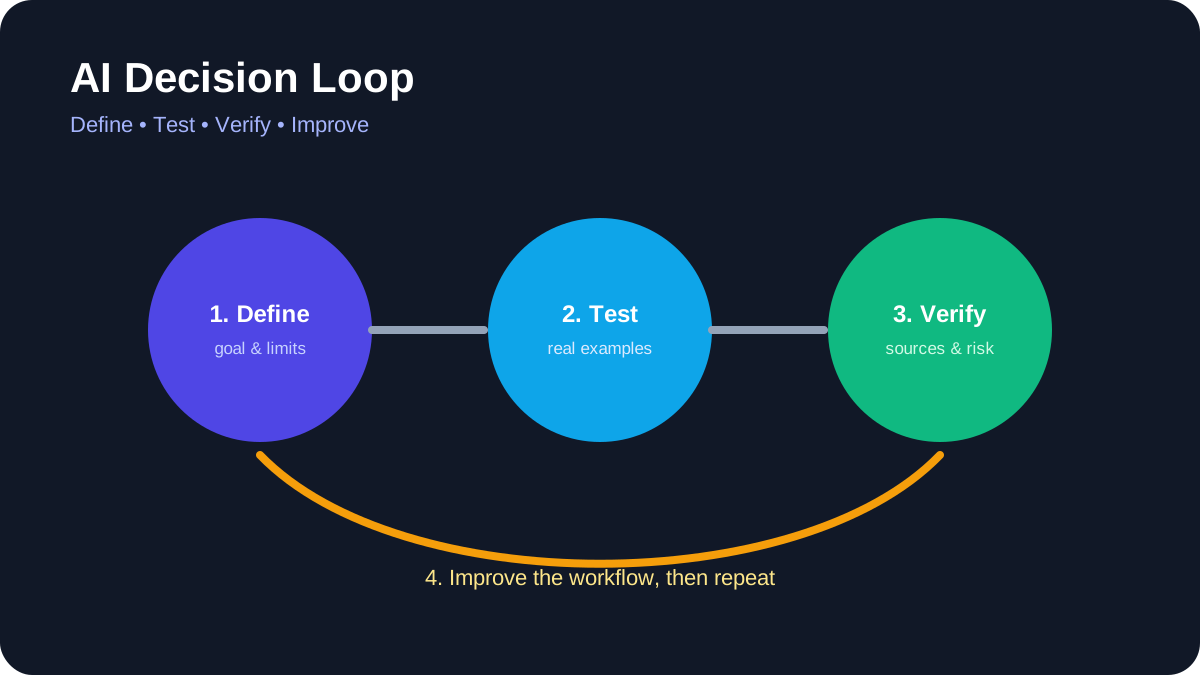
AI Decision Loop. Define the task, test real examples, verify evidence, and improve the workflow.
Forget coding bootcamps and Python syntax—AI isn’t just for developers anymore. Today, anyone with curiosity and 30 minutes a day can build chatbots, generate marketing copy, analyze spreadsheets, or even design logos—no technical background required. Use the figures in an example as design targets rather than promised results. Measure quality, latency, reliability, and cost with your own representative data before making a production decision.
Why AI Literacy Is Now a Universal Skill—Not a Technical Specialty
The AI revolution has shifted from infrastructure to interface. What’s changed isn’t the power of AI—it’s the accessibility. Modern AI tools now prioritize human-centered design: drag-and-drop workflows, conversational prompts, visual logic builders, and real-time feedback loops. This isn’t ‘dumbed down’ AI—it’s intelligently abstracted AI. Use the figures in an example as design targets rather than promised results. Measure quality, latency, reliability, and cost with your own representative data before making a production decision.
The Cognitive Shift: From Syntax to Strategy
Traditional programming demands mastery of logic structures, memory management, and debugging syntax. AI tools for non-programmers flip that model: users focus on intent, context, and outcome. A marketing manager doesn’t need to write a transformer model—they need to know how to frame a prompt that turns a product spec sheet into three compelling email variants. That’s a strategic, not technical, skill.
Evidence of Rapid Skill Transfer
g. Treat sensitive records as a security boundary: use approved organizational accounts, minimize the data you provide, remove direct identifiers, and require a qualified human to review every consequential output.
Breaking the ‘Tech Person’ Myth
Myth: “Only engineers can understand AI.” Reality: AI literacy is closer to spreadsheet literacy than software engineering. Just as millions use Excel formulas without knowing how the calculation engine works, today’s AI tools let users harness LLMs, computer vision, and predictive analytics through interfaces modeled on familiar workflows—like Google Docs, Canva, or Trello.
Top 5 Intuitive AI Tools Designed Specifically for Non-Programmers
Not all ‘no-code’ AI tools are created equal. Many still require configuration via JSON, API keys, or logic trees that assume technical fluency. This is an illustrative workflow, not a verified testimonial. It shows how the tools can fit together; the outcome will depend on the user’s inputs, review process, plan limits, and local requirements.
Tome eliminates slide-by-slide design fatigue. Users type a prompt like “Explain climate policy impacts on small farms in Southeast Asia—3 slides, visual, optimistic tone,” and Tome generates a narrated, animated presentation with embedded data visualizations, cited sources, and editable copy—all in under 45 seconds. Its ‘Prompt Canvas’ teaches prompt engineering through guided questions (“Who is your audience? What’s the core message? What emotion should this evoke?”), making it both a tool and a tutor.
2. Gamma.app: The ‘Word Processor for Presentations’
Gamma treats presentations like documents: type, edit, restructure, and embed live data—all without leaving the editor. Its AI ‘Assistant’ doesn’t just generate slides—it refines drafts, suggests visuals based on semantic analysis, and auto-formats for accessibility (contrast, font size, alt-text generation). A school principal in rural Kenya used Gamma to convert handwritten parent meeting notes into bilingual (Swahili/English) presentation decks—without touching PowerPoint.
Notion AI goes beyond chatbot responses. It lives inside your notes, databases, and calendars—learning your workflow patterns. Ask it to “summarize last week’s project updates into a 3-bullet executive summary” or “turn this meeting transcript into action items with owners and deadlines,” and it executes in context. Its ‘AI Templates’ library includes pre-built workflows like “Customer Feedback Analyzer,” “Grant Application Writer,” and “Lesson Plan Generator”—all designed by educators, nonprofit admins, and HR professionals.
4. Canva Magic Studio: Visual AI That Understands Intent
Canva’s Magic Studio doesn’t just generate images—it interprets visual language. Upload a photo of your handmade soap, type “Make this look like a luxury spa brand on Instagram—minimalist, warm tones, elegant serif font,” and it delivers 5 on-brand variations. Its ‘Magic Switch’ converts presentations to videos, documents to social posts, and blog outlines to infographics—preserving structure and voice. Over 4. The practical value of this approach should be judged by a completed project, transparent evaluation criteria, and results checked against the learner’s own goals rather than by unsupported performance claims.
5. Zapier Interfaces: AI-Powered Automation Without Coding
Zapier’s new ‘Zapier Interfaces’ lets non-programmers build custom internal tools—like a client onboarding portal or inventory tracker—using natural language. Type “I need a form where sales reps enter new client details, and it auto-creates a Notion page, sends a welcome email, and adds them to Mailchimp”—and Zapier builds the entire workflow with zero scripting. Its ‘Explain This Zap’ feature translates technical logic into plain English (“This step checks if the email domain is ‘gmail.com’ before sending the welcome sequence”), demystifying automation logic in real time.
How to Choose the Right Tool: A Decision Matrix for Real-World Goals
Selecting an AI tool isn’t about features—it’s about alignment with your daily reality. This is an illustrative workflow, not a verified testimonial. It shows how the tools can fit together; the outcome will depend on the user’s inputs, review process, plan limits, and local requirements.
Goal-Based Tool Matching
Creating content (blogs, emails, scripts): Prioritize tools with strong prompt scaffolding and tone control—e.g., Jasper (for marketing teams) or Rytr (for budget-conscious solopreneurs).
Analyzing data (spreadsheets, surveys, CRM notes): Choose tools with natural-language query engines—e.g., AskYourData (imports Excel/Google Sheets and answers “What were our top 3 customer complaints last quarter?” in plain English).
Designing visuals (logos, social posts, presentations): Focus on semantic understanding—not just image generation—e.g., Kittl (for vector-based branding) or Pictory (for turning long-form text into short videos).
Usability Thresholds: Red Flags to Watch For
Walk away from any tool that: (1) requires you to paste API keys or edit JSON, (2) lacks a ‘Try It Now’ demo without signup, (3) doesn’t offer video walkthroughs in your native language, or (4) hides its pricing behind a ‘Book a Demo’ gate. These are signals the tool wasn’t designed for true beginners.
Accessibility as a Core Feature—Not an Afterthought
Truly intuitive tools embed accessibility: screen-reader compatibility, keyboard-navigable interfaces, adjustable text size, and AI-generated alt-text. Tools like Microsoft’s AI for Accessibility suite and Descript (for captioning and audio editing) set the standard—proving inclusivity and intuitiveness are inseparable.
Beginner-Friendly Guides That Actually Work: What Makes a Tutorial Effective?
Most ‘beginner-friendly’ AI tutorials fail—not from lack of effort, but from flawed pedagogy. They assume users know what a ‘prompt’ is, why ‘temperature’ matters, or how to evaluate hallucination. The most effective AI tutorials for non-programmers using intuitive software tools and beginner-friendly guides share five evidence-based traits, validated by learning science research at the University of Helsinki’s Human-AI Interaction Lab.
Micro-Learning with Embedded Practice
Effective guides break concepts into 90-second chunks, each ending with a ‘Try Now’ prompt. Example: After explaining ‘persona prompting,’ the tutorial says: “Open Tome.app. Type: ‘Explain blockchain to a 10-year-old using a pizza analogy.’ Click ‘Generate.’ Compare your output with the sample—we’ll discuss why the pizza analogy worked.” This builds muscle memory, not just theory.
Contextual Glossaries—Not Jargon Dictionaries
Instead of defining ‘LLM’ in isolation, great guides embed definitions in action. In a Canva tutorial, it reads: “When you type ‘make this look like a luxury brand,’ Canva’s AI uses a large language model—a system trained on millions of design briefs—to match your words to visual patterns. You don’t need to know how it works—just that it learns from real-world examples, not rules.”
Failure-First Design
The best guides anticipate and normalize errors. A Notion AI tutorial includes a section titled “Why Your First Prompt Gave Weird Results (and What to Fix)” with side-by-side comparisons: a vague prompt (“Write about coffee”) vs. a refined one (“Write a 150-word Instagram caption for a women-owned coffee roastery in Portland—highlight sustainability, use emojis, and include a CTA to visit their tasting room”). This reduces frustration and builds prompt intuition.
Real-World Project Scaffolding
Instead of isolated exercises, top guides scaffold full projects: “Week 1: Build a client onboarding checklist in Notion AI. Week 2: Turn it into a shareable PDF with Canva. Week 3: Automate email delivery with Zapier Interfaces.” This mirrors how people actually work—and delivers tangible value early.
Step-by-Step Learning Path: From Zero to Confident AI Practitioner in 21 Days
This isn’t theoretical. Each day requires 22–38 minutes—designed for lunch breaks or commutes. The practical value of this approach should be judged by a completed project, transparent evaluation criteria, and results checked against the learner’s own goals rather than by unsupported performance claims.
Days 1–3: Building Prompt Fluency
Day 1: Learn the 3-part prompt formula (Role + Task + Context) using Tome.app. Generate 3 versions of a personal bio.
Day 2: Practice ‘constraint prompting’ in Gamma.app: “Explain quantum computing in 2 sentences, using only words under 6 letters.”
Day 3: Use Notion AI to turn a messy meeting transcript into structured notes—then refine with tone control (“Make this sound warm but professional”).
Days 4–7: Automating Repetitive Tasks
Focus: Zapier Interfaces + Google Workspace. Build your first automation: “When a new row is added to my ‘Lead Capture’ Google Sheet, send a personalized welcome email via Gmail and add the contact to my ‘Follow-Up’ Notion database.” Includes troubleshooting common errors (e.g., “Why did it send 5 emails instead of 1?”).
Days 8–12: Visual Communication Mastery
Focus: Canva Magic Studio + Kittl. Tasks include: (1) Turning a product feature list into an Instagram carousel, (2) Converting a blog outline into a 60-second explainer video with Pictory, (3) Designing a bilingual event poster using AI translation + layout suggestions.
Days 13–17: Data Literacy Without Spreadsheets
Focus: AskYourData + Microsoft Copilot in Excel. Upload a sample sales CSV. Ask: “What month had the highest average order value? Show me a bar chart. Suggest 3 hypotheses based on product category data. ” This teaches causal reasoning—not just querying. The practical value of this approach should be judged by a completed project, transparent evaluation criteria, and results checked against the learner’s own goals rather than by unsupported performance claims.
Days 18–21: Synthesizing & Sharing Your AI Workflow
Final project: Document your end-to-end workflow (e. g. app. Publish it as a public link. Join the AI for All community forum to give/receive feedback. This is an illustrative workflow, not a verified testimonial. It shows how the tools can fit together; the outcome will depend on the user’s inputs, review process, plan limits, and local requirements.
Illustrative Workflows for Non-Programmers
Abstract concepts stick when anchored in human experience. This is an illustrative workflow, not a verified testimonial. It shows how the tools can fit together; the outcome will depend on the user’s inputs, review process, plan limits, and local requirements.
A Local-History Podcast Workflow
Maya launched a local history podcast using only Canva (for cover art), Descript (for editing and auto-captions), and Notion AI (to turn her handwritten interview notes into episode show notes with timestamps and key quotes). “I’d never used a microphone before,” she says. “But the tutorials didn’t talk about decibels or waveforms—they asked, ‘What story do you want to tell first? ’ That’s the language I understood. This is an illustrative workflow, not a verified testimonial. It shows how the tools can fit together; the outcome will depend on the user’s inputs, review process, plan limits, and local requirements.
A Multilingual Menu Workflow
Diego used Gamma. app to create a trilingual (Spanish/English/Portuguese) digital menu for his empanada cart. He uploaded photos, typed prompts like “Make this look delicious and trustworthy—use warm colors, show hands holding empanadas, add a ‘Vegan Options’ badge,” and shared the live link via WhatsApp. “Before, tourists pointed at photos. This is an illustrative workflow, not a verified testimonial. It shows how the tools can fit together; the outcome will depend on the user’s inputs, review process, plan limits, and local requirements.
A Privacy-Conscious Administrative Workflow
Facing 120+ daily patient notes, Dr. Amina used Notion AI to build a ‘Clinical Note Assistant.’ She trained it on her past notes (anonymized) to auto-generate SOAP-format summaries, flag potential drug interactions, and draft parent-friendly discharge instructions in Yoruba or Igbo. “It didn’t replace my judgment,” she clarified in a WHO webinar. “It gave me back 90 minutes a day to hold a child’s hand instead of typing.”
Common Pitfalls—and How to Avoid Them
Even with intuitive tools, beginners hit predictable roadblocks. These aren’t failures—they’re feedback loops. Here’s how to navigate them.
Pitfall #1: Prompt Vagueness Leading to Generic Outputs
Solution: Adopt the ‘5W + 1H’ prompt checklist before generating: Who is the audience? What is the core action? When will this be used? Where will it appear? Why does this matter? How should it feel? Test it: “Write a birthday message” → “Write a warm, humorous 3-sentence birthday message for my sister (age 32, loves hiking and bad puns) to post on Instagram—include one hiking pun.”
Pitfall #2: Over-Reliance on First Drafts
Solution: Treat AI output as a ‘first draft collaborator,’ not a final product. Build a 3-step review habit: (1) Fact-check claims (especially stats or names), (2) Align tone with your voice (read it aloud), and (3) Add one human-specific detail—e.g., a personal anecdote, local reference, or inside joke. This is where authenticity lives.
Pitfall #3: Tool Hopping Without Mastery
Solution: Commit to one tool for 14 days—even if it feels limiting. Mastery comes from depth, not breadth. Lena Park notes: “Using Gamma to build 12 different presentations teaches you more about visual storytelling than trying 12 tools once each. ” The practical value of this approach should be judged by a completed project, transparent evaluation criteria, and results checked against the learner’s own goals rather than by unsupported performance claims.
Practical Verification Checklist
Before treating any tutorial project as complete, review it as you would other technology work. This final check turns a demonstration into evidence that the workflow is useful in your own setting.
Define the task: Write down the input, intended output, audience, and a concrete success criterion before selecting a tool.
Use representative test material: Start with synthetic or non-sensitive data, then test several normal cases and edge cases rather than relying on one impressive output.
Check accuracy: Compare factual claims, calculations, quotations, and citations with authoritative primary sources. Never assume a confident answer is correct.
Review privacy and permissions: Do not upload confidential, personal, copyrighted, or regulated material unless your organization has approved the service and configuration.
Measure the trade-offs: Record setup time, editing time, failure modes, accessibility, export options, plan limits, and the cost of repeated use.
Keep human accountability: Assign a person to approve consequential outputs and document where AI assistance was used when disclosure is appropriate.
Recheck before deployment: Software interfaces and model versions change. Retest the workflow after meaningful updates and maintain a manual fallback for important work.
About the author: Femica Maydinda Harend writes practical technology guides for AILooma with an emphasis on understandable workflows, responsible tool selection, and steps readers can verify for themselves. The editorial team reviews articles for clarity, unsupported claims, link quality, and reader safety before publication.
Frequently Asked Questions
What’s the absolute easiest AI tool to start with if I’ve never used any tech beyond email and WhatsApp?
Gamma. app is the strongest recommendation. It requires no signup to try (just click ‘Start New’), uses familiar document-like editing, and its AI Assistant responds to plain-English requests like “Make this shorter” or “Add a friendly closing sentence. The practical value of this approach should be judged by a completed project, transparent evaluation criteria, and results checked against the learner’s own goals rather than by unsupported performance claims.
Do I need to pay for these tools to get real value—or are free tiers sufficient for beginners?
Yes—free tiers are not just sufficient, they’re strategically ideal. Tome.app, Gamma.app, Canva (free plan), and Notion AI (free tier includes 20 AI responses/week) all offer full core functionality without paywalls. Paid tiers add speed, storage, or team features—not fundamental capabilities. Start free, master the workflow, then upgrade only when your output volume justifies it.
How do I know if an AI tutorial is truly beginner-friendly—or just labeled that way?
Look for these 3 signs: (1) It begins with a ‘Why this matters to YOU’ example—not technical definitions, (2) It includes screenshots or short video clips of the exact interface you’ll see (not generic stock images), and (3) It has a ‘What if this goes wrong?’ troubleshooting section. If it doesn’t, keep looking—true beginner-friendliness is transparent, not assumed.
Can I use these tools for my small business without violating data privacy laws like GDPR or HIPAA?
Yes—but with critical precautions. First, avoid pasting sensitive personal data (SSNs, medical records, financial details) into public AI tools. Second, use tools with built-in compliance: Notion AI offers HIPAA-compliant workspaces for healthcare teams; Zapier Interfaces supports SOC 2 and GDPR-compliant data routing. Always check the vendor’s compliance page—and when in doubt, anonymize first.
Will learning these tools make me obsolete—or more valuable in my current role?
Resoundingly more valuable. Why? Because AI handles execution—freeing you to focus on strategy, empathy, ethics, and complex judgment: the irreplaceable human skills. You’re not becoming a robot—you’re becoming a better human collaborator with technology. The practical value of this approach should be judged by a completed project, transparent evaluation criteria, and results checked against the learner’s own goals rather than by unsupported performance claims.
Mastering AI isn’t about becoming a coder—it’s about reclaiming time, deepening impact, and speaking the language of tomorrow’s workflows. The tools, tutorials, and real-world proof are here. You don’t need permission. You don’t need a degree. You just need 22 minutes—and the willingness to try. Start today. Your first prompt is waiting.
Practical example: a no-code AI workflow for a meeting summary
Start with a redacted transcript or a short set of notes. Ask the AI tool to separate decisions, open questions, owners, and dates, then compare every item with the source before sharing it.
Define the output fields before entering the notes.
Remove personal or confidential details that are not required.
Ask for source excerpts beside each important claim.
Mark uncertain items for human review.
Save the approved summary and the original notes separately.
This example keeps the workflow useful for a non-programmer while preserving a clear review boundary.
Practical verification and limits
Start with non-sensitive examples, keep a learning log, verify outputs, and stop before connecting private accounts or making consequential decisions.
Editorial review and limitations
Reviewed by Femica Maydinda Harend. Course content, tools, prices, and model capabilities change; verify current details and use a reversible test before relying on a recommendation.
A free learning path is useful only if it has a sensible order and a way to check what you learned. This guide links to provider-maintained resources; it is not a ranking, certification recommendation, or claim that AILooma completed every course.
Stage 1: Learn the vocabulary
Begin with an introductory explanation of data, models, training, inference, and common limitations. Keep a list of terms you cannot yet explain in your own words. Do not begin by installing a large toolchain unless your goal requires it.
Stage 2: Try a guided exercise
Google’s Machine Learning Crash Course offers lessons and exercises; check the current prerequisites and environment before choosing a module. The Kaggle Learn catalog provides course pages with their own topic and notebook requirements. Select one resource whose requirements match your time, device, and current skill.
Stage 3: Explore an open model or concept
Hugging Face Learn publishes learning material for several machine-learning topics. Each course can assume different tools and prerequisites, so read the course page before starting and use the official documentation for version-specific steps.
Stage 4: Complete one small, checkable project
Choose a non-sensitive, narrow task. Define an expected result and one failure case before using a model. Compare its output against a human-reviewed reference and explain what the exercise cannot establish. A small project is a learning checkpoint, not proof of production readiness or job qualification.
A checkpoint after every stage
Explain one concept without copying the lesson wording.
Describe the exercise input and the result you expected.
Identify an incorrect, ambiguous, or unsupported output.
Record the next concept you need to learn.
Privacy and cost checks
“Free course” does not mean every linked cloud service or model is free to use. Check account, hardware, usage limits, data handling, and terms before entering information or enabling a paid resource. Use public or synthetic examples while learning.
Follow the path by checkpoint, not by calendar
Stage 1 — vocabulary: learn what a model, training example, prediction, and evaluation set mean. Move on when you can explain one model limitation in your own words.
Stage 2 — guided exercises: use the interactive explanations and programming exercises in Google’s Machine Learning Crash Course, checking prerequisites and the current exercise environment. If you want notebook-based practice, inspect the course requirements in Kaggle Learn. Access, account needs, and content can change.
Stage 3 — one narrow project: choose permitted sample data, write an expected result, and keep an ambiguous example. Use the project note to record setup, one failure, and what the exercise cannot show. Do not move to private or consequential data just because a demo worked.
Stage 4 — choose a direction: if you want to code, inspect developer-oriented material such as Hugging Face Learn and check its library and hardware prerequisites. If you want workplace fluency, choose a permitted low-risk task and review its output against a source. If you need to evaluate a decision-support use, add a risk-appropriate human review process.
At every stage, confirm whether “free” means free content, free software, or a free tier with account, compute, or usage limits. This page is a sequence, not a course ranking or report of completed coursework. Use the beginner selection checklist if you are still choosing what to study.
Femica Maydinda Harend writes practical technology guides for AILooma focused on understandable steps and reader-verifiable checks.
Editorial note
Providers may change course content, access, and requirements. This is a documentation-based path suggestion, not a report of outcomes or course testing.
Developers choosing AI learning materials should start with the software they intend to build and the environment where it must run. This guide maps official learning resources to common development goals; it does not rank courses or promise employment or production results.
Choose the destination first
Understand machine-learning fundamentals: review Google’s Machine Learning Crash Course and confirm the current math, programming, and exercise prerequisites.
Learn model and dataset tooling: explore the relevant courses in Hugging Face Learn and follow the versioned library documentation for the components you plan to use.
Practice notebook-based concepts: inspect the current course descriptions in Kaggle Learn; review notebook and account requirements.
Deploy within a cloud provider: use that provider’s own training and service documentation, and account for access, region, quota, and cost requirements before following a lab.
Turn a tutorial into a technical decision record
For each exercise, note the runtime, library versions, model or dataset identifier, input assumptions, expected output, and how you checked it. Keep secrets out of notebooks and source control. Use synthetic or permitted public data during initial experiments.
Before calling a prototype production-ready
Separate functional tests from model evaluation. Define what happens when input is missing, the output is unsupported, an external service is unavailable, or a tool call fails. Add monitoring and an owner for errors. Require approval for consequential or irreversible actions. Keep a rollback route.
A minimal learning sequence
Refresh the relevant programming and data fundamentals.
Complete one official lesson and explain the exercise without relying on generated code alone.
Build a small prototype with permitted data and repeatable setup instructions.
Evaluate normal and edge cases against a human-reviewed reference.
Write down operational, privacy, licensing, and maintenance questions before deployment.
Match a learning resource to a developer deliverable
Choose one destination before choosing a course. A fundamentals lesson should leave you able to explain a concept and inspect an exercise; a library tutorial should leave you able to reproduce a small example in a pinned environment; a production-systems module should help you identify monitoring, data, and feedback-loop risks. These are different learning outcomes, so do not use completion of one as proof of the others.
A short explanation of one concept plus a reproduced exercise and its limitation
Notebook-based practice
The current Kaggle Learn catalog; check each course’s notebook and account requirements
A versioned notebook with input source, expected output, and a failure case
Open-model or NLP tooling
Hugging Face Learn; select the course matching the library or model family you intend to use
A minimal reproducible example with dependencies, license notes, and a data boundary
Production readiness
Google’s production-ML modules and the NIST AI RMF for lifecycle and risk questions
An evaluation plan, rollback condition, owner, and monitoring note—not just a demo
For each resource, record prerequisites, software versions, account or compute needs, license, and what you should be able to build afterward. Start with a toy or permitted dataset; do not put credentials, customer records, or confidential code into a public notebook. If the resource’s current instructions differ from a saved note, follow the current provider documentation and update your environment record.
Femica Maydinda Harend writes practical technology guides for AILooma, emphasizing verifiable learning and transparent constraints.
Editorial note
Course coverage, software versions, and cloud pricing change. Use provider documentation for current behavior; this guide does not claim a resource was tested by AILooma.
This plan is for learners who understand ideas best by making something small. It avoids tool rankings and focuses on a project loop that can be repeated with different topics. Use sample data and treat each result as a hypothesis to inspect, not as proof of general model quality.
Step 1: Pick a narrow question
Choose a task with a visible result, such as sorting fictional comments into themes, classifying permitted images, or asking a model to extract dates from a public notice. Avoid high-impact tasks and sensitive inputs.
Step 2: Define a human reference
Before asking a model, decide what a correct or acceptable output would look like. Write down normal examples and at least one ambiguous case. If you cannot tell whether an answer is right, narrow the task or find an authoritative source.
Step 3: Follow one official learning exercise
Use a current lesson from Google’s Machine Learning Crash Course or an exercise in the Kaggle Learn catalog, after confirming prerequisites and account requirements. The goal is to understand the technique, not to collect courses or copy code without explanation.
Step 4: Change one thing at a time
Keep the task and evaluation examples stable while changing one prompt, input feature, or setting. Record what changed and whether the result moved closer to your reference. A small sample cannot support broad accuracy estimates.
Step 5: Write a short project note
Purpose and intended user.
Tool, version, date, and setup needed to reproduce.
Allowed input and expected output.
Observed failure and a human-review rule.
Privacy, cost, and limitations.
Step 6: Decide whether to continue
Continue only if you can explain what the model did, where it failed, and what additional evidence would be needed. For work or production use, check permissions, representative data, monitoring, fallback, and human accountability with the responsible team.
Use a project brief before you open a notebook
Small projects become easier to compare when the learner decides what “finished” means first. Copy this brief into a note: question; intended user; permitted input; output a person can inspect; human reference; likely failure; privacy boundary; and the next decision if the result is wrong. If you cannot write a reference answer, narrow the project until correctness can be judged.
Keep a change log for the learning loop
For each attempt, change one prompt, data example, feature, or setting at a time. Record the change and inspect the same examples again. Keep ambiguous and out-of-scope cases in the review set rather than removing them because they are inconvenient. This helps you notice when an apparent improvement on familiar examples comes with a new failure elsewhere; it is not a statistical performance estimate.
End a project with a short handoff note: what the model was asked to do, what it cannot establish, what sources or sample data were used, and what a human must verify. A project is ready to share as a learning artifact when another person can reproduce its setup and understand its limitations. Production work needs additional controls, evaluation data, monitoring, and an accountable owner.
This article focuses on a reusable project loop. For a set of fictional input/output demonstrations, see the sample-data examples; for a staged path with three build briefs, use the project progression.
If you are new to AI, the hardest part is often choosing a first learning resource without confusing marketing claims, coding prerequisites, and different goals. This guide is a selection checklist—not a ranking or a claim that AILooma tested these courses. It focuses on what a beginner should verify before spending time or money.
First decide what you want to do
Understand the concepts: choose a plain-language introduction that explains model limits and examples.
Use AI in an existing task: choose a guided resource inside the application or workflow you already use.
Build a model or application: expect programming, data, and evaluation prerequisites; choose a course that states them clearly.
Check a course using five questions
Prerequisites: Does it assume math, Python, an account, or a paid cloud service?
Practice: Does it include an exercise you can complete, rather than only videos?
Feedback: Can you compare your result with an expected output or answer key?
Freshness: Does the provider identify the course version or update date? Interfaces and models change.
Cost and data: Is the learning material free? Does the exercise require a paid account or uploading personal data?
A simple sample first week
Day 1: Write down a task you want AI to help with and a way to judge a useful result. Day 2: Learn a few basic terms from an introductory lesson. Day 3: Try one exercise with sample, non-sensitive input. Day 4: check its answer against a source or known reference. Day 5: record an error or limitation and try a revised prompt or method. The schedule is illustrative; choose a pace you can sustain.
Examples of providers to inspect
Start with the provider’s own catalog and confirm the current course outline before committing. Google publishes a Machine Learning Crash Course with lessons and exercises. Kaggle offers a Learn catalog whose prerequisites and notebook requirements should be checked on each course page. Hugging Face hosts learning materials for topics including NLP and machine learning. These resources have different audiences and requirements; they are examples to evaluate, not a one-size-fits-all ranking.
When a tutorial is not the right next step
If you only need a small personal task, a full model-building course may be unnecessary. If you are using confidential work material, do not paste it into a public AI tool without approval. If your goal involves consequential decisions, add a qualified human reviewer and use an organization-approved process.
Femica Maydinda Harend writes practical technology guides for AILooma, focusing on approachable explanations and steps readers can verify.
Editorial note
Course availability, access, prerequisites, and pricing can change. Verify current details with the provider before enrolling; this article does not claim a course outcome or certification benefit.
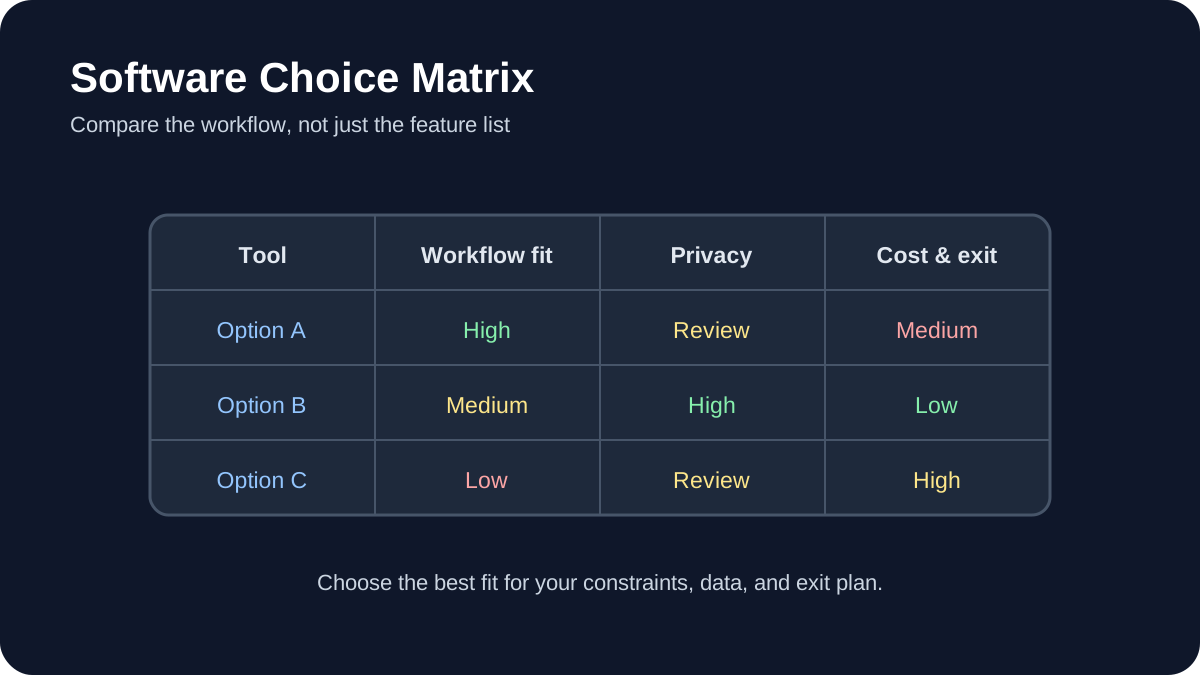
Software Choice Matrix. Compare workflow fit, privacy, portability, and total cost before choosing a tool.
The strongest free AI learning resources let you build something, inspect the result, and repeat the process. This guide curates official tutorials and documentation for data science, machine learning, large language models, computer vision, audio, evaluation, and deployment.
Quick answer
Beginners can start with Kaggle Learn or TensorFlow notebooks. Developers interested in open models can use Hugging Face Learn. Teams moving toward production should add experiment tracking, evaluation, data versioning, security testing, and documented human review.
Important: free software does not guarantee free compute, storage, API access, or commercial usage rights. Check each project’s current license and service terms.
How these resources were selected
Every primary recommendation links to an official project or maintainer resource. The list favors runnable examples, visible prerequisites, active documentation, reproducibility, and a path from basic concepts to practical work. It does not claim that every resource is suitable for every learner.
1. Kaggle Learn
Kaggle Learn offers practical courses and guides covering Python, pandas, machine learning, natural language processing, computer vision, model evaluation, and newer generative-AI topics. Its browser-based environment reduces local setup, which makes it useful for an initial project.
Review dataset licenses and notebook resource limits before relying on the platform for ongoing work. Export important notebooks and document dependencies.
2. Hugging Face Learn
Hugging Face Learn provides maintained courses for large language models, agents, computer vision, audio, diffusion, reinforcement learning, and other open-source ecosystems. Course prerequisites vary; some tracks assume Python and machine-learning fundamentals.
Read model cards, dataset cards, and licenses before using artifacts. Open availability does not automatically mean a model is appropriate for sensitive or commercial work.
3. TensorFlow Tutorials
TensorFlow’s official tutorials are Jupyter notebooks that can run in Google Colab. Beginner material starts with the Keras sequential API and expands into data loading, text, images, structured data, and more advanced workflows.
Record package versions when saving a notebook. A tutorial that runs in a hosted environment today may need dependency changes later.
4. PyTorch Tutorials
PyTorch Tutorials cover tensors, datasets, model building, optimization, distributed training, computer vision, and deployment-related topics. Use the beginner series before adapting advanced examples.
Choose the installation instructions for your operating system and hardware from the official site. GPU support depends on compatible drivers and packages.
5. scikit-learn User Guide and Examples
scikit-learn is a practical entry point for conventional machine learning. Its documentation connects algorithms with preprocessing, model selection, pipelines, metrics, and common pitfalls.
Start with a simple baseline before choosing a more complex model. Keep training and evaluation data separate and select metrics that match the real cost of errors.
6. fast.ai
Practical Deep Learning for Coders emphasizes building working models and then examining the underlying concepts. It is better suited to learners comfortable with coding than absolute beginners who have never used Python.
Follow the course’s current environment instructions rather than copying setup steps from an older blog post.
7. OpenCV tutorials
OpenCV tutorials cover image processing, feature detection, camera calibration, object detection, and related computer-vision foundations. They are useful for understanding the processing around an AI model, not only the model itself.
Use authorized images and test across lighting, camera, and subject variation. A demonstration on one image does not establish reliable real-world performance.
8. MediaPipe documentation
MediaPipe Solutions documents ready-to-use tasks for vision, text, and audio across supported platforms. It can shorten prototyping, but developers should still inspect model limitations, platform requirements, and data handling.
9. spaCy course and usage guides
spaCy’s official usage documentation covers production-oriented natural-language processing, including pipelines, linguistic features, training, and packaging. It is appropriate when a deterministic NLP pipeline may be more suitable than a general-purpose language model.
10. MLflow tutorials
MLflow’s getting-started resources cover experiment tracking for machine learning and current workflows for LLMs and agents, including tracing and evaluation. Tracking is valuable because it connects a result with the code, parameters, data, and environment that produced it.
11. DVC documentation
DVC’s getting-started documentation introduces data and experiment versioning alongside Git-based projects. It is useful when datasets and model artifacts are too large or unsuitable for a normal source repository.
Versioning does not replace access control or backup. Decide where remote data is stored and who is authorized to retrieve it.
12. NVIDIA NeMo Guardrails
NeMo Guardrails documentation provides examples for adding programmable controls around conversational AI applications. Guardrails are one layer of defense and do not eliminate the need for authorization, output validation, monitoring, or human review.
A project-based learning sequence
Learn Python and data handling with a small public dataset.
Train and evaluate a conventional baseline.
Repeat the task with a neural-network framework when justified.
Record experiments and dependencies.
Create edge cases and adversarial tests.
Package a small interface or API without exposing secrets.
Document data, model, limitations, and rollback.
Responsible implementation checklist
Use data you are allowed to use. Inspect licenses. Separate training, validation, and test data. Do not publish performance numbers without a reproducible method. Test demographic and environmental variation where relevant. Treat downloaded models and packages as supply-chain dependencies. Validate model output before another system executes it.
The AILooma AI implementation roadmap explains how to add ownership, permissions, evaluation, security, and rollback when a learning project becomes an operational system.
Final takeaway
A good free tutorial should lead to evidence: a notebook you understand, an experiment you can reproduce, or an application whose limitations you can explain. Choose one resource that matches your current level, complete a small project, and document the failures before adding another tool.
Practical example: a first AI learning project with a measurable result
A beginner can turn a broad learning plan into a small project by choosing one input, one transformation, and one evaluation. For example, collect a modest set of public product reviews, classify each review as positive, neutral, or negative, and compare the model’s labels with a small human-reviewed sample.
Define the task and the labels before writing code.
Keep a separate test set that is not used while adjusting the prompt or model.
Record the model version, prompt, date, and any preprocessing steps.
Review incorrect and uncertain predictions instead of reporting only the accuracy number.
Write a short limitations note explaining where the model should not be trusted.
This project teaches data preparation, evaluation, reproducibility, and responsible interpretation at the same time. It also produces a concrete artifact—a dataset, a short report, and a repeatable notebook—that demonstrates learning more clearly than a list of tutorials completed.
Practical verification and limits
Prefer official documentation and reproducible notebooks, check license and hardware requirements, pin versions for experiments, and document results rather than copying unverified claims.
Editorial review and limitations
Reviewed by Femica Maydinda Harend. Recommendations are based on documented behavior and reproducible checks. Tools, models, and policies can change; verify current details before acting.
AI Decision Loop. Define the task, test real examples, verify evidence, and improve the workflow.
You do not need to become a programmer to use artificial intelligence responsibly. Non-technical professionals can get value from AI by choosing bounded tasks, protecting sensitive information, checking outputs, and keeping people accountable for final decisions.
Quick answer
Begin with reversible work such as brainstorming, restructuring your own draft, summarizing public material, or creating a checklist. Do not upload confidential data, verify every important claim, and keep human approval for communication, publication, purchases, and decisions about people.
Best for: writers, educators, marketers, administrators, managers, designers, and small-business teams.
What “non-technical” AI use actually means
Using an AI application does not require understanding every detail of model training. It does require understanding the task, the information being shared, the limitations of the output, and the consequences of a mistake. These are operational skills rather than programming skills.
A useful starting question is: “Can I check the answer?” If you cannot verify the result or do not have authority to share the input, the task is not suitable for casual AI assistance.
1. Drafting from information you provide
AI can reorganize notes into an outline, suggest alternative wording, or adapt a draft for a defined audience. Provide the source material and specify what must remain unchanged. Compare the output with the original before using it.
Do not ask the system to invent quotations, customer stories, statistics, or personal experience. Authorship and accountability remain with the person who approves the final text.
2. Summarizing public or authorized documents
Ask for a summary that separates facts, recommendations, and unresolved questions. Require page numbers or links when the tool supports them. Then open the source and confirm important details, especially dates, thresholds, exclusions, and legal language.
For sensitive internal documents, use only tools and accounts approved by the organization. Personal subscriptions may have different retention and administration controls.
3. Brainstorming alternatives
AI is useful for generating options when the final choice belongs to a human. Examples include possible interview questions, lesson activities, campaign angles, or ways to structure a presentation. Treat suggestions as raw material, not expert advice.
State constraints such as audience, budget, tone, accessibility, and prohibited claims. Reject ideas that rely on stereotypes, unverifiable facts, or unsafe actions.
4. Creating checklists and templates
A model can turn an established process into a draft checklist. Give it the actual process and ask it to identify missing decisions or ambiguous steps. Have the process owner validate the result before anyone relies on it.
Templates should include an owner, review point, exception path, and version date. Otherwise, a convenient document can quietly become outdated policy.
5. Comparing information
AI can organize supplied product specifications, requirements, or survey responses into a table. It should not invent missing values. Ask it to mark unavailable information explicitly and link to primary sources.
Prices, plan limits, product names, and features change. Check official vendor pages before publishing a comparison or making a purchase.
6. Assisting with visual work
Tools such as Canva provide AI-assisted image, audio, and background features. Current usage limits depend on the plan, and generated material still requires review for accuracy, accessibility, rights, and brand fit. Use the product’s official help center for current controls.
Do not represent generated images as documentary evidence. Add alt text based on what the image communicates, not a keyword list.
7. Organizing a workspace
Workspace assistants can help locate authorized information, rewrite notes, or draft task lists. Review sharing permissions before connecting additional sources. Test in a small area so the assistant cannot expose material across teams or clients.
Notion’s help center, for example, documents current AI availability and connected-source behavior. Similar products differ, so do not assume settings transfer from one service to another.
8. Preparing meetings
Use AI to draft an agenda from confirmed objectives, summarize non-sensitive preparation material, or format action items. A human should confirm decisions, owners, and deadlines. Meeting transcripts may contain personal or confidential information and should be handled according to workplace policy.
9. Improving accessibility and clarity
AI can propose plain-language versions, headings, summaries, or alternative descriptions. These are starting points. Check that simplification did not remove necessary qualifications and that accessibility guidance is reviewed by someone familiar with the audience.
10. Learning unfamiliar concepts
Ask for an explanation, examples, and questions you can use to test your understanding. Then confirm the concept with authoritative documentation or instruction. AI can support learning, but it can also produce convincing errors.
Tasks that require extra caution
Do not delegate hiring, firing, credit, medical, legal, financial, disciplinary, or safety decisions to a general AI tool. Avoid entering passwords, private keys, identity documents, unpublished financial information, protected health information, or confidential client material.
When an AI tool can send messages or change another system, follow the controls in AILooma’s AI agent safety guide. Use least privilege, approval gates, logs, and a clear way to revoke access.
A simple verification routine
Read the answer once for overall meaning.
Compare it with the supplied source.
Verify names, dates, numbers, links, and quotations independently.
Check what important context was omitted.
Remove private information and unsupported claims.
Have the accountable person approve the final result.
How to evaluate whether a tool belongs in your workflow
Test one real task with safe data. Record setup effort, correction time, output quality, privacy controls, export options, and cost. Repeat the task before drawing conclusions. A product is useful only when it improves the full workflow, including human review.
Final takeaway
Non-technical users do not need to surrender control to benefit from AI. Clear tasks, safe inputs, source checking, limited permissions, and human accountability matter more than clever prompting. Start small and expand only when the evidence from your own workflow supports it.
Practical example: using AI safely for a non-technical weekly report
A non-technical professional can start with low-risk material such as a draft agenda or a redacted set of notes. Ask the tool to organize information, not to make a final decision or invent missing facts.
Remove names, account numbers, confidential figures, and anything the service does not need.
Give the tool a clear format: summary, open questions, source text, and suggested next steps.
Compare every important statement with the original notes.
Mark uncertain items and ask a subject-matter colleague to review them.
Save the final human-approved version and record where AI assistance was used.
This workflow preserves the professional’s judgment while using AI for structure and first drafts. It also creates a clear boundary between assistance and accountability.
Practical verification and limits
Classify information before sharing it, use approved tools, verify important outputs against source documents, and keep a person accountable for final decisions.
Editorial review and limitations
Reviewed by Femica Maydinda Harend. Recommendations are based on documented behavior and reproducible checks. Tools, models, and policies can change; verify current details before acting.