Tag: free AI tutorials

  • Three Free AI Practice Exercises You Can Complete with Sample Data

    Three Free AI Practice Exercises You Can Complete with Sample Data

    Reading about AI is easier when you have a small exercise to try. These three exercises use synthetic or public sample material and focus on observing behavior—not claiming that a model is accurate or ready for important decisions. Check current account requirements and terms on each provider’s site before using a service.

    Exercise 1: Sort short feedback into themes

    Create a small set of fictional feedback lines such as “setup was clear” and “the export button was hard to find.” Ask a text model to group the lines into themes and quote the line supporting each theme. Then compare every grouping with your own labels. Add an ambiguous line and see whether the tool admits uncertainty. Do not use real customer feedback unless you have permission and an approved data-handling process.

    Exercise 2: Make a simple image classifier

    Use Google Teachable Machine to explore a small image-classification project with objects you can photograph or sample images you are allowed to use. Keep the classes visually distinct at first. Test with a new image that was not used during training, change the lighting or background, and note where predictions fail. This classroom-style experiment illustrates why sample selection matters; it is not evidence of production accuracy.

    Exercise 3: Inspect a beginner machine-learning lesson

    Choose one exercise from Google’s Machine Learning Crash Course. Before reading the solution, write down what you expect the model or calculation to do. Complete the exercise, compare your reasoning with the explanation, and note which assumption you misunderstood. Check the lesson’s current prerequisites and exercise environment before starting.

    Keep a one-page learning record

    For each exercise, record the goal, the sample input, the expected output, the observed output, one failure case, and what the exercise cannot tell you. This helps separate a demonstration from evidence. A small toy dataset cannot establish real-world accuracy, fairness, security, or suitability for a high-impact task.

    Safety and privacy

    • Use fictional or otherwise permitted sample data.
    • Do not upload personal, confidential, regulated, or copyrighted material without authorization.
    • Verify factual outputs against original sources.
    • Keep a person responsible for consequential choices.

    Add an expected result and a failure check to each exercise

    Before you run an exercise, write the result you expect and a case that should make the tool uncertain. This turns a demonstration into a small learning activity without pretending it measures real-world performance.

    • Feedback themes: create fictional lines with two obvious themes and one ambiguous comment. Ask for each proposed theme to include the exact supporting line. Check whether it invents a theme or ignores the ambiguous item.
    • Image classification: keep training examples separate from the new image used for checking. Change a harmless background or lighting condition and note whether the model follows the object or the incidental setting. Do not treat a small classroom set as an accuracy estimate.
    • Course exercise: before reading an explanation, write down your prediction. Afterward, record which assumption changed and find the lesson’s explanation for the difference.

    Use a compact log with the exercise goal, data source, expected result, observed output, failure case, and privacy note. If a tool asks you to upload personal or copyrighted material, stop and choose a permitted sample instead. This page offers standalone practice exercises; for a connected project progression with a reusable README, use the project-based learning path.

    Related reading

    If you want a sequence of resources rather than standalone exercises, see the free learning path. To compare course requirements first, use the beginner course-selection checklist.

    About the author

    Femica Maydinda Harend writes practical technology guides for AILooma, with an emphasis on exercises that readers can repeat and evaluate themselves.

    Editorial note

    These are learning suggestions, not a report of tests conducted by AILooma. Provider interfaces, access requirements, and terms may change; confirm them before use.


  • A Project-Based AI Learning Path: Three Small Builds and How to Check Them

    A Project-Based AI Learning Path: Three Small Builds and How to Check Them

    Projects help learners connect an idea with an observable result. The builds below are deliberately small and use non-sensitive sample inputs. They are learning exercises, not benchmark tests, product reviews, or proof that a model is suitable for production.

    Project 1: Create an image classifier

    In Teachable Machine, define two or three simple image classes, collect a modest set of permitted examples, and train a model. Keep some new examples aside for a manual check. Test whether a changed background, angle, or lighting changes the prediction. Record misclassifications and explain why a small classroom exercise cannot establish performance on a broader population.

    Project 2: Follow a machine-learning lesson

    Pick a lesson and matching exercise in Google’s Machine Learning Crash Course. Write an expected outcome before running it. After completing the exercise, explain in your own words how the input, model, and evaluation relate. If the notebook or lesson requirements do not match your device, use the provider’s current setup instructions rather than a third-party download.

    Project 3: Build a small text-labeling review

    Create fictional sentences and assign human labels such as “billing,” “setup,” or “feedback.” Ask an AI tool to suggest labels, then compare suggestions with the labels you wrote. Mark uncertain or incorrect outputs. Do not treat the exercise as a reliable classifier, and do not use customer or employee text without permission.

    A repeatable project record

    1. State the task and who would use the result.
    2. Record the tool, date, version if visible, and setup requirements.
    3. Describe sample inputs and what was excluded.
    4. Write expected output and a simple pass/fail rule.
    5. Include a normal case and an edge case.
    6. Note failures, privacy implications, and what you would need to validate before wider use.

    What a small project cannot prove

    A few examples cannot establish broad accuracy, fairness, reliability, safety, or return on investment. For consequential uses, use representative data under an approved process, evaluate failures, and involve qualified reviewers. Avoid uploading sensitive data to a public tool.

    Make the three builds a progression

    Use the projects as a portfolio of learning artifacts, not three unrelated tool demonstrations. For each build, save the question, setup, permitted sample data, expected result, observed output, failure case, and next step. A later project should add one new skill—such as designing a reference label, reviewing errors, or documenting a data boundary—rather than simply adding a more impressive interface.

    1. Before the first build: write a one-sentence scope and identify an example the model should not accept.
    2. Between builds: compare the new method with the earlier baseline and explain what changed. Keep the previous example set so you can detect regressions.
    3. At the final build: prepare a short README with setup requirements, input provenance, known failure modes, and instructions for another learner to reproduce the exercise.

    Do not publish private images, personal data, or credentials in a project file. A small demonstration cannot show that a model will generalize, remain fair, or be safe in production. This article is a sequenced project path; the practice-exercise guide instead gives standalone sample-data activities.

    Related reading

    For a course selection framework, read the beginner tutorial checklist. Developers looking for official technical learning material can use the developer resource guide.

    About the author

    Femica Maydinda Harend writes practical technology guides for AILooma, prioritizing clear examples and transparent limitations.

    Editorial note

    This is an instructional outline, not a record of AILooma running or validating these projects. External course details and tool behavior may change.

  • A Free AI Learning Path: Move from Core Ideas to One Checked Project

    A Free AI Learning Path: Move from Core Ideas to One Checked Project

    A free learning path is useful only if it has a sensible order and a way to check what you learned. This guide links to provider-maintained resources; it is not a ranking, certification recommendation, or claim that AILooma completed every course.

    Stage 1: Learn the vocabulary

    Begin with an introductory explanation of data, models, training, inference, and common limitations. Keep a list of terms you cannot yet explain in your own words. Do not begin by installing a large toolchain unless your goal requires it.

    Stage 2: Try a guided exercise

    Google’s Machine Learning Crash Course offers lessons and exercises; check the current prerequisites and environment before choosing a module. The Kaggle Learn catalog provides course pages with their own topic and notebook requirements. Select one resource whose requirements match your time, device, and current skill.

    Stage 3: Explore an open model or concept

    Hugging Face Learn publishes learning material for several machine-learning topics. Each course can assume different tools and prerequisites, so read the course page before starting and use the official documentation for version-specific steps.

    Stage 4: Complete one small, checkable project

    Choose a non-sensitive, narrow task. Define an expected result and one failure case before using a model. Compare its output against a human-reviewed reference and explain what the exercise cannot establish. A small project is a learning checkpoint, not proof of production readiness or job qualification.

    A checkpoint after every stage

    • Explain one concept without copying the lesson wording.
    • Describe the exercise input and the result you expected.
    • Identify an incorrect, ambiguous, or unsupported output.
    • Record the next concept you need to learn.

    Privacy and cost checks

    “Free course” does not mean every linked cloud service or model is free to use. Check account, hardware, usage limits, data handling, and terms before entering information or enabling a paid resource. Use public or synthetic examples while learning.

    Follow the path by checkpoint, not by calendar

    Stage 1 — vocabulary: learn what a model, training example, prediction, and evaluation set mean. Move on when you can explain one model limitation in your own words.

    Stage 2 — guided exercises: use the interactive explanations and programming exercises in Google’s Machine Learning Crash Course, checking prerequisites and the current exercise environment. If you want notebook-based practice, inspect the course requirements in Kaggle Learn. Access, account needs, and content can change.

    Stage 3 — one narrow project: choose permitted sample data, write an expected result, and keep an ambiguous example. Use the project note to record setup, one failure, and what the exercise cannot show. Do not move to private or consequential data just because a demo worked.

    Stage 4 — choose a direction: if you want to code, inspect developer-oriented material such as Hugging Face Learn and check its library and hardware prerequisites. If you want workplace fluency, choose a permitted low-risk task and review its output against a source. If you need to evaluate a decision-support use, add a risk-appropriate human review process.

    At every stage, confirm whether “free” means free content, free software, or a free tier with account, compute, or usage limits. This page is a sequence, not a course ranking or report of completed coursework. Use the beginner selection checklist if you are still choosing what to study.

    Related reading

    If you are still choosing your first course, use the beginner selection checklist. For a concrete project sequence, see the project-based learning guide.

    About the author

    Femica Maydinda Harend writes practical technology guides for AILooma focused on understandable steps and reader-verifiable checks.

    Editorial note

    Providers may change course content, access, and requirements. This is a documentation-based path suggestion, not a report of outcomes or course testing.

  • 12 Free AI Development Resources for Hands-On Learning

    12 Free AI Development Resources for Hands-On Learning

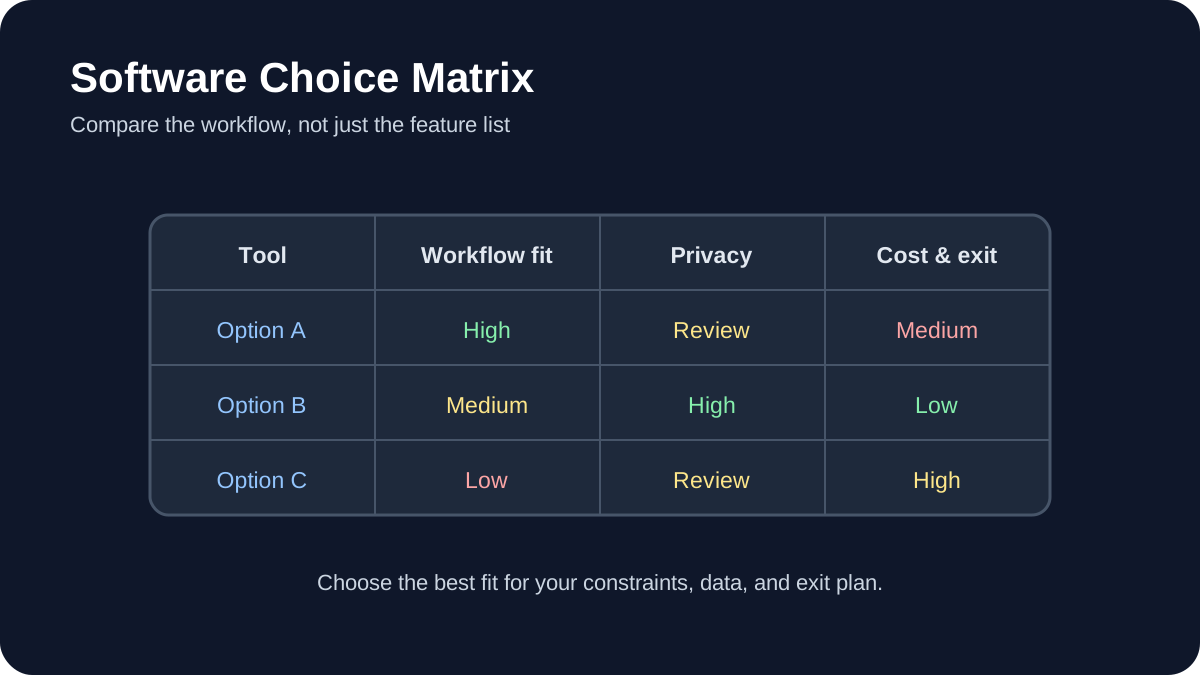
    Software Choice Matrix: Compare workflow fit, privacy, portability, and total cost before choosing a tool.
    Software Choice Matrix. Compare workflow fit, privacy, portability, and total cost before choosing a tool.

    The strongest free AI learning resources let you build something, inspect the result, and repeat the process. This guide curates official tutorials and documentation for data science, machine learning, large language models, computer vision, audio, evaluation, and deployment.

    Quick answer

    Beginners can start with Kaggle Learn or TensorFlow notebooks. Developers interested in open models can use Hugging Face Learn. Teams moving toward production should add experiment tracking, evaluation, data versioning, security testing, and documented human review.

    Important: free software does not guarantee free compute, storage, API access, or commercial usage rights. Check each project’s current license and service terms.

    How these resources were selected

    Every primary recommendation links to an official project or maintainer resource. The list favors runnable examples, visible prerequisites, active documentation, reproducibility, and a path from basic concepts to practical work. It does not claim that every resource is suitable for every learner.

    1. Kaggle Learn

    Kaggle Learn offers practical courses and guides covering Python, pandas, machine learning, natural language processing, computer vision, model evaluation, and newer generative-AI topics. Its browser-based environment reduces local setup, which makes it useful for an initial project.

    Review dataset licenses and notebook resource limits before relying on the platform for ongoing work. Export important notebooks and document dependencies.

    2. Hugging Face Learn

    Hugging Face Learn provides maintained courses for large language models, agents, computer vision, audio, diffusion, reinforcement learning, and other open-source ecosystems. Course prerequisites vary; some tracks assume Python and machine-learning fundamentals.

    Read model cards, dataset cards, and licenses before using artifacts. Open availability does not automatically mean a model is appropriate for sensitive or commercial work.

    3. TensorFlow Tutorials

    TensorFlow’s official tutorials are Jupyter notebooks that can run in Google Colab. Beginner material starts with the Keras sequential API and expands into data loading, text, images, structured data, and more advanced workflows.

    Record package versions when saving a notebook. A tutorial that runs in a hosted environment today may need dependency changes later.

    4. PyTorch Tutorials

    PyTorch Tutorials cover tensors, datasets, model building, optimization, distributed training, computer vision, and deployment-related topics. Use the beginner series before adapting advanced examples.

    Choose the installation instructions for your operating system and hardware from the official site. GPU support depends on compatible drivers and packages.

    5. scikit-learn User Guide and Examples

    scikit-learn is a practical entry point for conventional machine learning. Its documentation connects algorithms with preprocessing, model selection, pipelines, metrics, and common pitfalls.

    Start with a simple baseline before choosing a more complex model. Keep training and evaluation data separate and select metrics that match the real cost of errors.

    6. fast.ai

    Practical Deep Learning for Coders emphasizes building working models and then examining the underlying concepts. It is better suited to learners comfortable with coding than absolute beginners who have never used Python.

    Follow the course’s current environment instructions rather than copying setup steps from an older blog post.

    7. OpenCV tutorials

    OpenCV tutorials cover image processing, feature detection, camera calibration, object detection, and related computer-vision foundations. They are useful for understanding the processing around an AI model, not only the model itself.

    Use authorized images and test across lighting, camera, and subject variation. A demonstration on one image does not establish reliable real-world performance.

    8. MediaPipe documentation

    MediaPipe Solutions documents ready-to-use tasks for vision, text, and audio across supported platforms. It can shorten prototyping, but developers should still inspect model limitations, platform requirements, and data handling.

    9. spaCy course and usage guides

    spaCy’s official usage documentation covers production-oriented natural-language processing, including pipelines, linguistic features, training, and packaging. It is appropriate when a deterministic NLP pipeline may be more suitable than a general-purpose language model.

    10. MLflow tutorials

    MLflow’s getting-started resources cover experiment tracking for machine learning and current workflows for LLMs and agents, including tracing and evaluation. Tracking is valuable because it connects a result with the code, parameters, data, and environment that produced it.

    11. DVC documentation

    DVC’s getting-started documentation introduces data and experiment versioning alongside Git-based projects. It is useful when datasets and model artifacts are too large or unsuitable for a normal source repository.

    Versioning does not replace access control or backup. Decide where remote data is stored and who is authorized to retrieve it.

    12. NVIDIA NeMo Guardrails

    NeMo Guardrails documentation provides examples for adding programmable controls around conversational AI applications. Guardrails are one layer of defense and do not eliminate the need for authorization, output validation, monitoring, or human review.

    A project-based learning sequence

    1. Learn Python and data handling with a small public dataset.
    2. Train and evaluate a conventional baseline.
    3. Repeat the task with a neural-network framework when justified.
    4. Record experiments and dependencies.
    5. Create edge cases and adversarial tests.
    6. Package a small interface or API without exposing secrets.
    7. Document data, model, limitations, and rollback.

    Responsible implementation checklist

    Use data you are allowed to use. Inspect licenses. Separate training, validation, and test data. Do not publish performance numbers without a reproducible method. Test demographic and environmental variation where relevant. Treat downloaded models and packages as supply-chain dependencies. Validate model output before another system executes it.

    The AILooma AI implementation roadmap explains how to add ownership, permissions, evaluation, security, and rollback when a learning project becomes an operational system.

    Final takeaway

    A good free tutorial should lead to evidence: a notebook you understand, an experiment you can reproduce, or an application whose limitations you can explain. Choose one resource that matches your current level, complete a small project, and document the failures before adding another tool.

    Official resources

    Practical example: a first AI learning project with a measurable result

    A beginner can turn a broad learning plan into a small project by choosing one input, one transformation, and one evaluation. For example, collect a modest set of public product reviews, classify each review as positive, neutral, or negative, and compare the model’s labels with a small human-reviewed sample.

    1. Define the task and the labels before writing code.
    2. Keep a separate test set that is not used while adjusting the prompt or model.
    3. Record the model version, prompt, date, and any preprocessing steps.
    4. Review incorrect and uncertain predictions instead of reporting only the accuracy number.
    5. Write a short limitations note explaining where the model should not be trusted.

    This project teaches data preparation, evaluation, reproducibility, and responsible interpretation at the same time. It also produces a concrete artifact—a dataset, a short report, and a repeatable notebook—that demonstrates learning more clearly than a list of tutorials completed.

    Practical verification and limits

    Prefer official documentation and reproducible notebooks, check license and hardware requirements, pin versions for experiments, and document results rather than copying unverified claims.

    Editorial review and limitations

    Reviewed by Femica Maydinda Harend. Recommendations are based on documented behavior and reproducible checks. Tools, models, and policies can change; verify current details before acting.