An interactive tutorial gives you a chance to make a choice, run an exercise, or observe an output instead of only reading. For a nontechnical learner, the useful question is whether the activity helps you understand a concept and its limits—not whether the page calls itself “AI.” This is a selection guide, not a ranking or course test.
Look for four signals
Visible practice: you can try an exercise and see how an input changes the result.
Explanation: the lesson explains why the result changed, not only which button to click.
Safe defaults: it uses sample data and says what not to upload.
Accessibility: instructions work with keyboard navigation and do not rely on color alone; captions or text alternatives are available where needed.
Examples of interactive formats
Teachable Machine provides a visual way to explore simple models using images, sounds, or poses. It is a demonstration environment; a small model project does not show that the model is dependable in a real setting.
Google’s Machine Learning Crash Course pairs instructional material with exercises. Check the current lesson’s prerequisites and format; some technical exercises may be less suitable if you want a purely no-code activity.
Kaggle’s Learn catalog includes short learning material and notebook-based exercises. Inspect the specific course page for account, coding, and environment requirements before starting.
Try one lesson before committing
Choose a short section. Before interacting, write down what you expect to happen. Try the exercise, note the result, and then change one input. A useful lesson will help you explain the difference. If an exercise asks for private information or does not explain its data handling, do not proceed until you understand the request.
Interactivity can make an explanation engaging but does not establish that a model is correct, fair, private, or suitable for an important decision. Treat the activity as a learning aid, and validate meaningful claims separately.
Try a lesson with a deliberate check
Before committing to an interactive course, choose one short activity and run it with non-sensitive sample input. Observe the full learning loop: does the lesson state a goal, let you make a meaningful choice, show what changed, explain why, and offer a way to check your understanding? A clickable animation without feedback may be engaging but does not necessarily teach the skill you need.
Write down the concept you expect to learn and the prerequisite you already have.
Complete one activity without copying its answer key first.
Explain the result in your own words and note one case the lesson does not cover.
Check whether the activity needs an account, downloads code, uploads data, or requires a particular browser or device.
Decide whether the format fits your access needs, including keyboard use, captions, pacing, and the option to revisit explanations.
If you cannot verify the output, choose a resource with worked explanations or an answer key. Google’s Machine Learning Crash Course exercises include interactive, programming, and knowledge-check formats; inspect the current prerequisites before starting. This is an example to evaluate, not a claim that AILooma tested the course.
This guide is specifically about the quality of interactive practice. For choosing a first course by background and goal, see the beginner course-selection checklist.
About the author
Femica Maydinda Harend writes practical technology guides for AILooma, emphasizing plain-language explanations and transparent limitations.
Editorial note
Course content, account requirements, and interfaces can change. Verify current requirements on provider pages; this article does not claim first-hand testing.
Examples can make AI concepts easier to understand, but an example should not be presented as a customer success story or proof of product performance unless the evidence exists. The patterns here are instructional demonstrations using fictional inputs. They are not reports of AILooma testing or real deployments.
Example 1: Sort fictional feedback
Create six fictional comments about a made-up app and label each “setup,” “navigation,” or “export.” Ask a text model to suggest labels and quote the phrase that supports each label. Compare the suggestions with your labels. Add a comment that could fit two categories and decide whether the right result is a human review rather than a forced choice.
Example 2: Extract fields from a sample request
Write a fictional request with a date, item, and missing field. Ask an AI tool to return a structured draft. Check every field against the original text and confirm that the missing information remains blank instead of being guessed. Do not use a real customer form for a public tool unless your organization has approved the data path.
Example 3: Search a small document set
Use a few public or fictional policy paragraphs. Ask a system to answer one question and identify the source paragraph for each part of its response. Remove the supporting paragraph and repeat the question. Note whether the system says it cannot find evidence or invents an answer. This explores source-grounding; a tiny exercise cannot establish reliability for a larger collection.
Record enough to repeat the example
Tool and version, if visible, plus date.
Fictional input and exact task prompt.
Expected result and human reference.
Observed output, correction, and one failure case.
Data, permissions, and assumptions excluded from the demo.
Make each example repeatable with a small test card
The examples are intentionally different from a course list: each demonstrates an input/output contract that a learner can inspect. Keep the inputs fictional, write the expected result before asking a model, and treat an unexpected result as a useful failure to explain—not evidence of general accuracy.
Example A: extract fields from a fictional request
Input: “Please send the sample kit to Room 4 on Friday.” Expected fields: item=sample kit, location=Room 4, date=Friday (year and calendar date unknown). Check that the system does not invent a year or a recipient. If the output schema requires a full date, the correct behavior is to ask for clarification.
Example B: answer from a tiny document set
Place two fictional policy paragraphs in a small permitted document collection. Ask a question whose answer appears in only one paragraph. Require a short answer and the source paragraph identifier. Then ask about a detail absent from both documents; the expected behavior is “not stated in the provided material,” not a plausible guess.
Example C: label a few fictional comments
Write a simple label guide first—for example, “setup,” “export,” and “unclear.” Label a few invented comments by hand, then ask for suggested labels plus the text span that supports each one. Include a comment that fits none of the labels. Review consistency and disagreement; do not describe this tiny exercise as a sentiment benchmark.
For each card, save the prompt, input, expected output, observed output, and one failure. Keep the provider, model version, and date if the tool exposes them. These short demonstrations teach test design; they do not replace the separate risk-tier evaluation method or establish product performance.
Femica Maydinda Harend writes practical technology guides for AILooma with an emphasis on transparent examples and limitations.
Editorial note
These are fictional teaching examples, not field results or a product review. Do not use sensitive material, and do not infer real-world accuracy from a toy exercise.
This tutorial shows how a beginner can explore a simple image-classification workflow without writing code. The purpose is to observe how examples influence a model, not to build a production classifier or claim measured accuracy. Use images you have permission to use and avoid photos containing identifiable people.
What you will make
Create a small model that distinguishes two visually different classes, such as a mug and a book. The model will return a suggested class for an image. It can be wrong when the background, angle, lighting, or object changes.
Create two classes and capture or add a small set of permitted examples for each. Keep examples varied but avoid putting the same image into both classes.
Train the project using the on-page controls. Wait for the interface to finish before testing.
Test with a new image that was not part of the examples. Try a different background or viewing angle.
Record a correct guess, an incorrect guess, and a case where a person should check the result.
Interpret the result carefully
A confidence display is not a guarantee that a prediction is correct. Your small sample is not representative of all cameras, environments, or objects. If you add more examples, change one factor at a time and keep a note of which examples were used. Do not use this exercise for identity, health, safety, hiring, or other consequential decisions.
Privacy and export choices
Read the provider’s current terms and privacy information before using personal images or saving a project. For organizational or sensitive use, ask for approval first. Do not assume that a browser-based tool processes every input locally simply because training happens in a browser.
What to learn next
After the exercise, explain in plain language what the classes were, which new examples failed, and why the result may not generalize. To study model evaluation and fundamentals beyond this visual demonstration, use a current lesson from Google’s Machine Learning Crash Course.
Build and inspect a small image project
Open Teachable Machine and choose an image project. Check the tool’s current interface and terms before adding data.
Create two clearly named classes and add a small set of images that you have permission to use. Keep class examples varied in angle and background; do not use identifiable people or confidential images for this learning exercise.
Train the model using the project controls, then test it with new images that were not used as examples. Try a changed background or lighting condition and record where the prediction becomes uncertain or wrong.
Use the preview to inspect all class outputs rather than only the top label. If examples from one class dominate or the prediction follows the background instead of the object, revise the sample set and repeat with a fresh test image.
Export only if you have a clear next use. The official Teachable Machine community repository documents model libraries and export snippets; review the target format and licensing/hosting implications before embedding it.
Troubleshoot the learning result
If the preview is unstable, check that class names are distinct, input images are relevant to the target, and the test example is genuinely separate from training examples. If the model appears to learn a background or camera position, collect more varied permitted examples rather than increasing confidence claims. If export is unavailable or fails, save the learning notes and consult current provider resources; the preview alone does not validate an exported deployment.
Use the exercise to learn about training examples and generalization, not to identify people, make safety decisions, or claim production accuracy. For standalone exercise cards across different concepts, see the sample-data practice guide.
Femica Maydinda Harend writes practical technology guides for AILooma, focusing on accessible workflows that readers can try and inspect.
Editorial note
This tutorial outline is documentation-based; AILooma is not claiming to have run or validated a particular model. Tool interfaces and terms may change.
Professionals do not need a generic list of “AI skills” before they can begin learning. A more useful first step is to choose one permitted work task, identify what a good result means, and learn only the concepts needed to assess that task. This guide offers a role-neutral plan; it does not promise time savings, job outcomes, or productivity gains.
Choose an appropriate practice task
Pick work that is low-risk and easy to check, such as turning a public procedure into a draft checklist or organizing fictional notes into categories. Avoid using confidential documents, personal records, customer information, source code, or regulated material unless your organization has approved the tool and configuration.
Write a task brief before using AI
Goal: what should the output help you do?
Allowed material: what data may be used?
Quality check: what would make the output usable?
Failure condition: what error means you should not use it?
Human owner: who checks and approves the final work?
Learn in three short stages
Understand: learn what the tool can and cannot access, and how it handles your inputs.
Practice: try a sample task with fictional or public material; compare its response with your own reference.
Reflect: record what required correction, what information was missing, and whether the tool was worth using for this task.
Match resources to the goal
For broad AI literacy, inspect a current introductory course such as Google’s AI learning offerings. For technical fundamentals, Google’s Machine Learning Crash Course includes lessons and exercises, with prerequisites to review. For tool-specific workplace use, start with the documentation and approved training from the vendor or your organization. Do not assume that completing a course establishes professional qualification.
Discuss policy and accountability
Before incorporating a tool into a team process, ask who approves it, what data can be entered, whether outputs need disclosure or review, and how mistakes are corrected. Keep a manual route for important tasks. A human reviewer should be able to trace important claims to source material instead of accepting a polished response on appearance alone.
Turn a work task into a learning plan
Choose a task that is permitted by your workplace and has a human-checkable result. Write a one-page task brief with the current steps, information you may use, what a good result means, and which decision must remain with a person. Ask your manager or data owner to confirm the boundary before using real work material.
Learn the minimum concept. Study only what helps you judge the chosen task—such as drafting, summarization, classification, or source retrieval.
Practice with safe material. Use fictional or approved examples and write an expected result before asking a tool.
Review the failure. Note one incorrect, incomplete, or overconfident output and how you detected it.
Document a reusable check. Save a prompt-free process note or checklist that a colleague can follow without exposing protected content.
Decide whether to continue. Consider review effort, policy fit, accessibility, cost, and maintenance—not just the apparent speed of producing a draft.
Use training that matches your role and prerequisite level; do not assume one course or certificate proves workplace competence. If a task affects a customer, employment, money, health, or legal rights, keep the relevant qualified person responsible and follow organizational review rules.
Femica Maydinda Harend writes practical technology guides for AILooma, focusing on accessible learning and responsible workflows.
Editorial note
Available tools, workplace rules, and course requirements change. Confirm current details with the provider and your organization; this article does not report measured professional outcomes.
Choosing an AI course is easier when you start with what you want to do, rather than a “best course” ranking. Course pages change, and “beginner” can mean no coding, no machine-learning background, or simply a new framework. This guide compares current official learning resources by prerequisites and learning style; AILooma has not independently tested or ranked them. If you learn best by building one small example instead of comparing courses, start with this project-based AI learning guide.
Vendor documentation and learning paths can connect concepts to that provider’s services.
Separate free learning material from paid labs, cloud usage, certificates, or subscriptions; set a spending limit before creating resources.
A simple way to compare courses
Write one learning outcome. For example: explain what a training example is, or build a small classifier. Avoid goals such as “master AI.”
Check the starting requirements. Note whether the course expects Python, statistics, a cloud account, a GPU, or a paid plan.
Preview one lesson. Confirm the language, pace, accessibility, and whether instructions still match the current interface.
Check the exercises. Prefer a lesson where you can run or inspect an example and compare your result with an expected outcome.
Review privacy and cost. Do not upload confidential data to a learning tool. Check data handling and any cloud or API charges.
Finish one short unit before adding another. A completed exercise tells you more about fit than collecting many bookmarks.
A beginner-friendly first project
Try a small text-labeling exercise using public or synthetic sample sentences. Choose two labels, such as “question” and “request,” and write down what should count for each. Keep a few examples aside rather than showing all examples during practice. After following a course exercise, compare its output with your held-out examples, note ambiguous cases, and record where it makes mistakes. This is a learning exercise, not evidence that a model is ready for real customer messages.
If you use an online notebook or service, review its terms and avoid personal or workplace data. If the first result is poor, inspect the examples and labels before changing the model; ambiguous labels can make a simple exercise hard to interpret.
When to choose a different path
If you mainly need to use AI tools at work, start with an AI-literacy or responsible-use course rather than a deep-learning course.
If you already write Python, move toward a developer course with exercises and versioned code.
If you need to deploy a business system, a beginner course alone is not enough: learn about data access, evaluation, monitoring, security, and human review.
If a course promises a job, credential, or performance outcome, verify the exact terms with the provider instead of relying on promotional summaries.
Keep your learning reproducible
For each exercise, note the course and lesson, date, prerequisites, tool versions, input examples, expected result, and what happened. Label your own illustrative examples clearly. This makes it easier to resume later and to spot when a course or interface has changed.
Official beginner resources to compare by learning goal
The word “best” depends on whether you want to understand concepts, work through guided exercises, or build a first application. These provider-maintained resources are starting points to inspect, not a ranking or a claim that AILooma completed or tested each course.
People interested in model, dataset, NLP, or open-source tooling topics
Whether the lesson assumes Python, a particular library, hardware, or model-hosting account
Open the official course page and inspect one lesson before committing. Write down what you should be able to explain or build afterward, then complete one exercise with non-sensitive material. If you need a no-code introduction, choose a resource that explicitly supports it instead of assuming a general ML course will. If your aim is developer implementation, see the separate developer resource map; for a sequenced no-cost path from basics to one checked project, see the free learning path.
Course access, prerequisites, model versions, and pricing can change. Verify current provider details before enrolling or uploading data. This is a curated selection framework based on provider descriptions, not a hands-on course review.
Bottom line
There is no universal beginner course. Choose one that matches your starting skills, available time, privacy needs, and intended task. Preview the official course page, complete one exercise, then decide whether to continue or switch paths.
Developers choosing AI learning materials should start with the software they intend to build and the environment where it must run. This guide maps official learning resources to common development goals; it does not rank courses or promise employment or production results.
Choose the destination first
Understand machine-learning fundamentals: review Google’s Machine Learning Crash Course and confirm the current math, programming, and exercise prerequisites.
Learn model and dataset tooling: explore the relevant courses in Hugging Face Learn and follow the versioned library documentation for the components you plan to use.
Practice notebook-based concepts: inspect the current course descriptions in Kaggle Learn; review notebook and account requirements.
Deploy within a cloud provider: use that provider’s own training and service documentation, and account for access, region, quota, and cost requirements before following a lab.
Turn a tutorial into a technical decision record
For each exercise, note the runtime, library versions, model or dataset identifier, input assumptions, expected output, and how you checked it. Keep secrets out of notebooks and source control. Use synthetic or permitted public data during initial experiments.
Before calling a prototype production-ready
Separate functional tests from model evaluation. Define what happens when input is missing, the output is unsupported, an external service is unavailable, or a tool call fails. Add monitoring and an owner for errors. Require approval for consequential or irreversible actions. Keep a rollback route.
A minimal learning sequence
Refresh the relevant programming and data fundamentals.
Complete one official lesson and explain the exercise without relying on generated code alone.
Build a small prototype with permitted data and repeatable setup instructions.
Evaluate normal and edge cases against a human-reviewed reference.
Write down operational, privacy, licensing, and maintenance questions before deployment.
Match a learning resource to a developer deliverable
Choose one destination before choosing a course. A fundamentals lesson should leave you able to explain a concept and inspect an exercise; a library tutorial should leave you able to reproduce a small example in a pinned environment; a production-systems module should help you identify monitoring, data, and feedback-loop risks. These are different learning outcomes, so do not use completion of one as proof of the others.
A short explanation of one concept plus a reproduced exercise and its limitation
Notebook-based practice
The current Kaggle Learn catalog; check each course’s notebook and account requirements
A versioned notebook with input source, expected output, and a failure case
Open-model or NLP tooling
Hugging Face Learn; select the course matching the library or model family you intend to use
A minimal reproducible example with dependencies, license notes, and a data boundary
Production readiness
Google’s production-ML modules and the NIST AI RMF for lifecycle and risk questions
An evaluation plan, rollback condition, owner, and monitoring note—not just a demo
For each resource, record prerequisites, software versions, account or compute needs, license, and what you should be able to build afterward. Start with a toy or permitted dataset; do not put credentials, customer records, or confidential code into a public notebook. If the resource’s current instructions differ from a saved note, follow the current provider documentation and update your environment record.
Femica Maydinda Harend writes practical technology guides for AILooma, emphasizing verifiable learning and transparent constraints.
Editorial note
Course coverage, software versions, and cloud pricing change. Use provider documentation for current behavior; this guide does not claim a resource was tested by AILooma.
This plan is for learners who understand ideas best by making something small. It avoids tool rankings and focuses on a project loop that can be repeated with different topics. Use sample data and treat each result as a hypothesis to inspect, not as proof of general model quality.
Step 1: Pick a narrow question
Choose a task with a visible result, such as sorting fictional comments into themes, classifying permitted images, or asking a model to extract dates from a public notice. Avoid high-impact tasks and sensitive inputs.
Step 2: Define a human reference
Before asking a model, decide what a correct or acceptable output would look like. Write down normal examples and at least one ambiguous case. If you cannot tell whether an answer is right, narrow the task or find an authoritative source.
Step 3: Follow one official learning exercise
Use a current lesson from Google’s Machine Learning Crash Course or an exercise in the Kaggle Learn catalog, after confirming prerequisites and account requirements. The goal is to understand the technique, not to collect courses or copy code without explanation.
Step 4: Change one thing at a time
Keep the task and evaluation examples stable while changing one prompt, input feature, or setting. Record what changed and whether the result moved closer to your reference. A small sample cannot support broad accuracy estimates.
Step 5: Write a short project note
Purpose and intended user.
Tool, version, date, and setup needed to reproduce.
Allowed input and expected output.
Observed failure and a human-review rule.
Privacy, cost, and limitations.
Step 6: Decide whether to continue
Continue only if you can explain what the model did, where it failed, and what additional evidence would be needed. For work or production use, check permissions, representative data, monitoring, fallback, and human accountability with the responsible team.
Use a project brief before you open a notebook
Small projects become easier to compare when the learner decides what “finished” means first. Copy this brief into a note: question; intended user; permitted input; output a person can inspect; human reference; likely failure; privacy boundary; and the next decision if the result is wrong. If you cannot write a reference answer, narrow the project until correctness can be judged.
Keep a change log for the learning loop
For each attempt, change one prompt, data example, feature, or setting at a time. Record the change and inspect the same examples again. Keep ambiguous and out-of-scope cases in the review set rather than removing them because they are inconvenient. This helps you notice when an apparent improvement on familiar examples comes with a new failure elsewhere; it is not a statistical performance estimate.
End a project with a short handoff note: what the model was asked to do, what it cannot establish, what sources or sample data were used, and what a human must verify. A project is ready to share as a learning artifact when another person can reproduce its setup and understand its limitations. Production work needs additional controls, evaluation data, monitoring, and an accountable owner.
This article focuses on a reusable project loop. For a set of fictional input/output demonstrations, see the sample-data examples; for a staged path with three build briefs, use the project progression.
If you are new to AI, the hardest part is often choosing a first learning resource without confusing marketing claims, coding prerequisites, and different goals. This guide is a selection checklist—not a ranking or a claim that AILooma tested these courses. It focuses on what a beginner should verify before spending time or money.
First decide what you want to do
Understand the concepts: choose a plain-language introduction that explains model limits and examples.
Use AI in an existing task: choose a guided resource inside the application or workflow you already use.
Build a model or application: expect programming, data, and evaluation prerequisites; choose a course that states them clearly.
Check a course using five questions
Prerequisites: Does it assume math, Python, an account, or a paid cloud service?
Practice: Does it include an exercise you can complete, rather than only videos?
Feedback: Can you compare your result with an expected output or answer key?
Freshness: Does the provider identify the course version or update date? Interfaces and models change.
Cost and data: Is the learning material free? Does the exercise require a paid account or uploading personal data?
A simple sample first week
Day 1: Write down a task you want AI to help with and a way to judge a useful result. Day 2: Learn a few basic terms from an introductory lesson. Day 3: Try one exercise with sample, non-sensitive input. Day 4: check its answer against a source or known reference. Day 5: record an error or limitation and try a revised prompt or method. The schedule is illustrative; choose a pace you can sustain.
Examples of providers to inspect
Start with the provider’s own catalog and confirm the current course outline before committing. Google publishes a Machine Learning Crash Course with lessons and exercises. Kaggle offers a Learn catalog whose prerequisites and notebook requirements should be checked on each course page. Hugging Face hosts learning materials for topics including NLP and machine learning. These resources have different audiences and requirements; they are examples to evaluate, not a one-size-fits-all ranking.
When a tutorial is not the right next step
If you only need a small personal task, a full model-building course may be unnecessary. If you are using confidential work material, do not paste it into a public AI tool without approval. If your goal involves consequential decisions, add a qualified human reviewer and use an organization-approved process.
Femica Maydinda Harend writes practical technology guides for AILooma, focusing on approachable explanations and steps readers can verify.
Editorial note
Course availability, access, prerequisites, and pricing can change. Verify current details with the provider before enrolling; this article does not claim a course outcome or certification benefit.
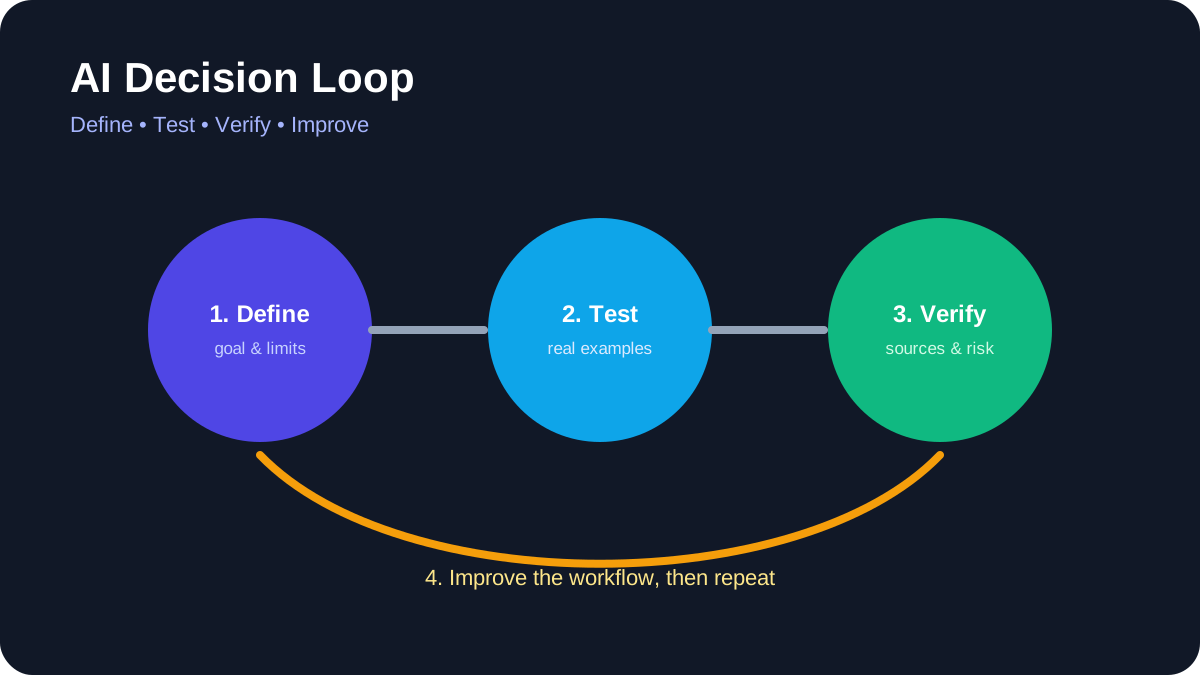
AI Decision Loop. Define the task, test real examples, verify evidence, and improve the workflow.
You do not need to become a programmer to use artificial intelligence responsibly. Non-technical professionals can get value from AI by choosing bounded tasks, protecting sensitive information, checking outputs, and keeping people accountable for final decisions.
Quick answer
Begin with reversible work such as brainstorming, restructuring your own draft, summarizing public material, or creating a checklist. Do not upload confidential data, verify every important claim, and keep human approval for communication, publication, purchases, and decisions about people.
Best for: writers, educators, marketers, administrators, managers, designers, and small-business teams.
What “non-technical” AI use actually means
Using an AI application does not require understanding every detail of model training. It does require understanding the task, the information being shared, the limitations of the output, and the consequences of a mistake. These are operational skills rather than programming skills.
A useful starting question is: “Can I check the answer?” If you cannot verify the result or do not have authority to share the input, the task is not suitable for casual AI assistance.
1. Drafting from information you provide
AI can reorganize notes into an outline, suggest alternative wording, or adapt a draft for a defined audience. Provide the source material and specify what must remain unchanged. Compare the output with the original before using it.
Do not ask the system to invent quotations, customer stories, statistics, or personal experience. Authorship and accountability remain with the person who approves the final text.
2. Summarizing public or authorized documents
Ask for a summary that separates facts, recommendations, and unresolved questions. Require page numbers or links when the tool supports them. Then open the source and confirm important details, especially dates, thresholds, exclusions, and legal language.
For sensitive internal documents, use only tools and accounts approved by the organization. Personal subscriptions may have different retention and administration controls.
3. Brainstorming alternatives
AI is useful for generating options when the final choice belongs to a human. Examples include possible interview questions, lesson activities, campaign angles, or ways to structure a presentation. Treat suggestions as raw material, not expert advice.
State constraints such as audience, budget, tone, accessibility, and prohibited claims. Reject ideas that rely on stereotypes, unverifiable facts, or unsafe actions.
4. Creating checklists and templates
A model can turn an established process into a draft checklist. Give it the actual process and ask it to identify missing decisions or ambiguous steps. Have the process owner validate the result before anyone relies on it.
Templates should include an owner, review point, exception path, and version date. Otherwise, a convenient document can quietly become outdated policy.
5. Comparing information
AI can organize supplied product specifications, requirements, or survey responses into a table. It should not invent missing values. Ask it to mark unavailable information explicitly and link to primary sources.
Prices, plan limits, product names, and features change. Check official vendor pages before publishing a comparison or making a purchase.
6. Assisting with visual work
Tools such as Canva provide AI-assisted image, audio, and background features. Current usage limits depend on the plan, and generated material still requires review for accuracy, accessibility, rights, and brand fit. Use the product’s official help center for current controls.
Do not represent generated images as documentary evidence. Add alt text based on what the image communicates, not a keyword list.
7. Organizing a workspace
Workspace assistants can help locate authorized information, rewrite notes, or draft task lists. Review sharing permissions before connecting additional sources. Test in a small area so the assistant cannot expose material across teams or clients.
Notion’s help center, for example, documents current AI availability and connected-source behavior. Similar products differ, so do not assume settings transfer from one service to another.
8. Preparing meetings
Use AI to draft an agenda from confirmed objectives, summarize non-sensitive preparation material, or format action items. A human should confirm decisions, owners, and deadlines. Meeting transcripts may contain personal or confidential information and should be handled according to workplace policy.
9. Improving accessibility and clarity
AI can propose plain-language versions, headings, summaries, or alternative descriptions. These are starting points. Check that simplification did not remove necessary qualifications and that accessibility guidance is reviewed by someone familiar with the audience.
10. Learning unfamiliar concepts
Ask for an explanation, examples, and questions you can use to test your understanding. Then confirm the concept with authoritative documentation or instruction. AI can support learning, but it can also produce convincing errors.
Tasks that require extra caution
Do not delegate hiring, firing, credit, medical, legal, financial, disciplinary, or safety decisions to a general AI tool. Avoid entering passwords, private keys, identity documents, unpublished financial information, protected health information, or confidential client material.
When an AI tool can send messages or change another system, follow the controls in AILooma’s AI agent safety guide. Use least privilege, approval gates, logs, and a clear way to revoke access.
A simple verification routine
Read the answer once for overall meaning.
Compare it with the supplied source.
Verify names, dates, numbers, links, and quotations independently.
Check what important context was omitted.
Remove private information and unsupported claims.
Have the accountable person approve the final result.
How to evaluate whether a tool belongs in your workflow
Test one real task with safe data. Record setup effort, correction time, output quality, privacy controls, export options, and cost. Repeat the task before drawing conclusions. A product is useful only when it improves the full workflow, including human review.
Final takeaway
Non-technical users do not need to surrender control to benefit from AI. Clear tasks, safe inputs, source checking, limited permissions, and human accountability matter more than clever prompting. Start small and expand only when the evidence from your own workflow supports it.
Practical example: using AI safely for a non-technical weekly report
A non-technical professional can start with low-risk material such as a draft agenda or a redacted set of notes. Ask the tool to organize information, not to make a final decision or invent missing facts.
Remove names, account numbers, confidential figures, and anything the service does not need.
Give the tool a clear format: summary, open questions, source text, and suggested next steps.
Compare every important statement with the original notes.
Mark uncertain items and ask a subject-matter colleague to review them.
Save the final human-approved version and record where AI assistance was used.
This workflow preserves the professional’s judgment while using AI for structure and first drafts. It also creates a clear boundary between assistance and accountability.
Practical verification and limits
Classify information before sharing it, use approved tools, verify important outputs against source documents, and keep a person accountable for final decisions.
Editorial review and limitations
Reviewed by Femica Maydinda Harend. Recommendations are based on documented behavior and reproducible checks. Tools, models, and policies can change; verify current details before acting.
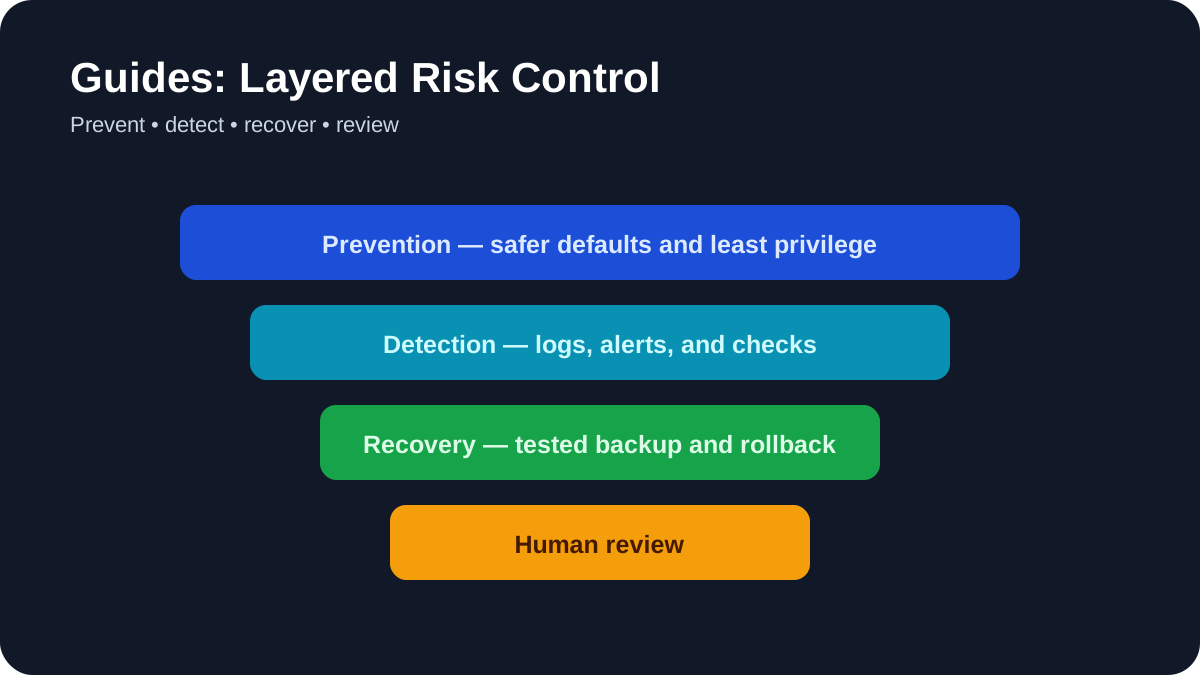
Layered Risk Control. Use prevention, detection, recovery, and human review together.
Moving an AI idea from a demonstration to a dependable system requires more than choosing a model. This implementation guide explains how to define the problem, create a baseline, build a limited prototype, evaluate failures, protect data, and introduce the system gradually.
Quick answer
Start with a documented user need and a non-AI baseline. Build the smallest reversible prototype, evaluate it with representative data, assign human accountability, and test security and failure handling before connecting production systems.
Best for: small teams planning an AI assistant, retrieval system, classifier, content workflow, or agent.
Phase 1: Define the decision and its consequences
Describe who will use the system, what information it receives, what it produces, and what happens if it is wrong. Separate low-impact assistance from decisions involving health, employment, finance, legal rights, safety, or access to essential services. High-consequence uses require qualified governance and domain expertise beyond a general tutorial.
Assign an owner before development begins. The owner is responsible for approving requirements, reviewing evidence, responding to incidents, and deciding when the system should be disabled.
Phase 2: Establish a baseline
Document how the work is completed today. Record quality criteria, turnaround time, common errors, operating cost, and user complaints where those measurements are legitimately available. An AI prototype should be compared with this baseline, not with an idealized promise.
Consider whether a search function, template, rule-based automation, or conventional software change can solve the problem more reliably. AI should be used because its capabilities match the task, not because it is fashionable.
Phase 3: Map data and permissions
List each data source, its owner, sensitivity, retention rule, and permitted use. Remove unnecessary personal information and secrets from development data. Use test accounts and synthetic examples where possible.
For integrations, grant access to the smallest required resource. Separate development and production credentials, store secrets outside source code, and define a revocation process. The NIST AI Risk Management Framework emphasizes mapping context and governing risk throughout the lifecycle rather than treating safety as a final checklist.
Phase 4: Build a narrow prototype
Limit the first version to one input path and one output. Keep model instructions, retrieval settings, prompts, schemas, and dependencies under version control. Record the model or service used and the date because hosted behavior can change.
If the system generates structured data, validate it against a schema. If it retrieves documents, show the source passages to the reviewer. If it can call tools, begin with read-only access and require approval before any consequential action.
Phase 5: Create an evaluation set
Build tests from realistic cases, including incomplete data, conflicting sources, unusual formatting, malicious instructions, and requests outside scope. Define success before running the system. Useful measures depend on the task and may include factual support, completeness, classification error, citation accuracy, refusal behavior, latency, cost, and human correction effort.
Do not rely only on an AI model to grade another AI model. Automated evaluation can help screen large sets, but important conclusions need human review and task-specific evidence.
Phase 6: Test retrieval and grounding
For retrieval-augmented generation, evaluate retrieval separately from generation. Confirm whether the system found the correct documents before judging the final answer. Test access control so users cannot retrieve material they are not authorized to view.
Require citations that point to accessible source material. A citation is not sufficient if the cited passage does not support the answer. Define what the system should do when no reliable source is available.
Phase 7: Threat-model the workflow
OWASP documents risks including prompt injection, sensitive information disclosure, supply-chain weaknesses, excessive agency, and improper output handling. Test whether untrusted documents or web pages can alter system instructions. Treat model output as untrusted input before passing it to code, databases, browsers, or external tools.
Set limits on actions, cost, runtime, and repeated calls. Log tool requests and human approvals. Never allow an agent to silently expand its own permissions.
Phase 8: Design human review
Human-in-the-loop must mean more than placing an approval button on the screen. Reviewers need the original input, relevant sources, uncertainty, changes made, and a practical way to correct or reject the result. Workload must be realistic; a reviewer cannot meaningfully inspect hundreds of high-risk outputs in seconds.
Document which decisions remain human responsibility. AILooma’s guide to using AI agents without losing control provides additional approval and audit-log patterns.
Phase 9: Prepare operations and rollback
Define monitoring, incident reporting, user feedback, model or dependency updates, backups, and rollback. Track changes to prompts, retrieval indexes, model versions, evaluation data, and permissions. Re-run important tests after each material change.
Create a kill switch that owners understand. Preserve a manual process for critical work until the new system has demonstrated reliable operation under normal conditions.
Phase 10: Release gradually
Begin with internal users, low-risk data, and limited scope. Review failures frequently, then expand only when evidence supports it. Tell users when they are interacting with AI and how to report a problem. Avoid presenting generated answers as authoritative when uncertainty remains.
Implementation readiness checklist
The user need and non-AI alternative are documented.
An accountable owner and escalation path exist.
Data sources, permissions, and retention are approved.
Evaluation includes normal, edge, and adversarial cases.
Sources and outputs can be inspected by reviewers.
External actions require appropriate approval.
Monitoring, versioning, rollback, and incident response are tested.
Users receive clear disclosure and a feedback path.
Final takeaway
A responsible AI implementation is a managed system, not a clever prompt. The strongest teams make scope, evidence, ownership, permissions, and rollback visible from the beginning. That discipline makes it easier to improve the system and safer to stop it when the evidence changes.
Practical example: moving an AI prototype toward production
Imagine an internal assistant that summarizes support tickets. Before launch, write a one-page release plan that names the users, allowed data, success measures, owner, escalation path, and rollback trigger.
Start with a small pilot group and synthetic or redacted examples.
Measure task success, citation quality, latency, cost, and the rate of human corrections.
Log prompts and outputs with access controls and a retention period.
Require a human approval step for external messages or consequential decisions.
Define how to pause the system, revert a prompt or model version, and notify users.
This turns “the demo works†into an accountable operating process. A production decision should be based on evidence from the intended workflow, not a single impressive sample.
Practical verification and limits
Define success and failure thresholds, assign an owner, test data quality and security, keep human approval for consequential actions, and document rollback conditions.
Editorial review and limitations
Reviewed by Femica Maydinda Harend. Recommendations are based on documented behavior and reproducible checks. Tools, models, and policies can change; verify current details before acting.